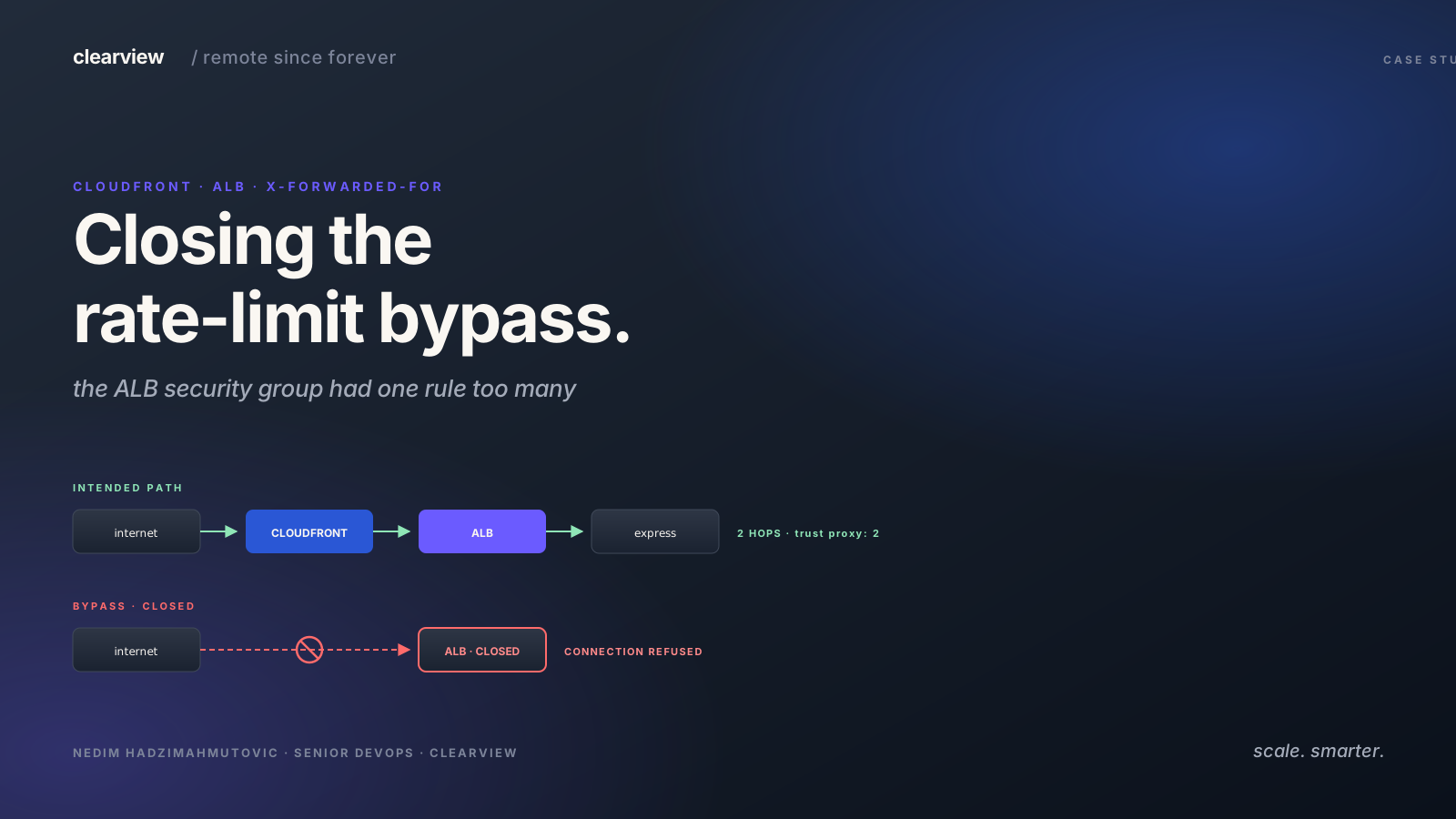

Three weeks before a client's public launch, we were reviewing the security of their Express API — the usual sweep of every endpoint the public would be able to reach. The login rate limiter was already in place. The intent was right. The code worked. And yet, with one HTTP header on each request, an attacker could make unlimited login attempts and the limiter would count every one as a different visitor.
One line of curl did it — the command-line tool engineers use to send HTTP requests by hand, the same kind your browser sends when it loads a page:
curl -H "X-Forwarded-For: 203.0.113.7" https://api.client.example/auth/signin
The -H flag attaches a header to the request. X-Forwarded-For is the header proxies use to record the visitor's real IP address as the request travels through them. We will come back to why setting it by hand breaks the limiter.
The rest of this post is the reproduction recipe, the root cause, and the fix that closed the gap without breaking real traffic.
The Client Architecture
The intended request path looked like this:
Client → CloudFront → ALB → Express (Node.js)
What each of those four boxes actually is:
- Client — the visitor's browser, or an attacker's terminal.
- CloudFront — AWS's content delivery network. It sits at the edge of the internet, caches static files, and forwards everything else inward.
- ALB — Application Load Balancer. AWS's traffic distributor. Takes requests from CloudFront and routes them to whatever application server is healthy.
- Express (Node.js) — the application itself. The login endpoint and the rate limiter live here.
Two proxy hops between the visitor and the application. Each proxy prepends — adds to the front of — the X-Forwarded-For header. CloudFront writes the visitor's real IP at the front first, then the ALB writes CloudFront's IP at the front of that. By the time the request reaches Express, the header reads:
X-Forwarded-For: <real-client-ip>, <cloudfront-edge-ip>
Express needs the real client IP for rate limiting. That is what trust proxy exists for:
// express.ts:12
app.set('trust proxy', 2);
trust proxy: 2 tells Express that there are exactly two trusted proxies between the visitor and the application, and to skip the last two IPs in the X-Forwarded-For header (XFF for short) to find the real one:
XFF: <real-client>, <cloudfront>
         ↑              ↑
      req.ip         skip (proxy 1)
                    ALB adds its own (proxy 2, not in XFF)
Express reads the real client IP. The rate limiter counts per IP. Everything works — until you skip the proxy chain entirely.
What We Caught
The first signal was the ALB responding directly:
curl -v "$API/api/config" 2>&1 | grep -iE "server|x-cache|via"
# server: awselb/2.0
server: awselb/2.0 with no x-cache or via header. The request had reached the ALB without going through CloudFront. That changes the math. When traffic skips CloudFront, there is only one proxy hop, not two.
Direct to ALB (1 hop):
  XFF: <attacker-injected-ip>
           ↑
        Express reads this as req.ip
        (skips 2, but there is only 1 real proxy)
With trust proxy: 2, Express trims two entries from the right of X-Forwarded-For. There was only one real proxy. So Express reached into the part of the header the attacker controls and used whatever the attacker put there as the source IP.
We confirmed the rate limiter worked normally first:
# Five sign-in attempts from the same IP — rate limited correctly
for i in $(seq 1 5); do
  curl -s -o /dev/null -w "%{http_code} " -X POST \
    "$API/api/auth/signin" \
    -H "Content-Type: application/json" \
    -d '{"email":"test@example.com","password":"wrong"}'
done
# 429 429 429 429 429
Then with rotating fake IPs:
# Five attempts with rotating X-Forwarded-For — limiter sees five different "users"
for i in $(seq 1 5); do
  curl -s -o /dev/null -w "%{http_code} " -X POST \
    "$API/api/auth/signin" \
    -H "Content-Type: application/json" \
    -H "X-Forwarded-For: 10.0.$((RANDOM % 255)).$((RANDOM % 255))" \
    -d '{"email":"test@example.com","password":"wrong"}'
done
# 400 400 400 400 400
400s, not 429s. Every request reached the sign-in logic. The rate limiter saw each request as a different IP because Express trusted the attacker's X-Forwarded-For. Each fake IP carries its own counter, and no counter ever hits the threshold.
Brute force went through unimpeded. We reproduced it in staging and in production.
Why the ALB Was Reachable At All
The ALB security group was supposed to restrict inbound traffic to CloudFront only. The intended rule was present:
ingress {
  description = "lb_cloudfront_https_ingress_only"
  from_port   = 443
  to_port     = 443
  protocol    = "tcp"
  prefix_list = [data.aws_ec2_managed_prefix_list.cloudfront.id]
}
But three other rules were also present, left over from an earlier migration:
ingress {
  from_port   = 80
  to_port     = 80
  protocol    = "tcp"
  cidr_blocks = ["0.0.0.0/0"]
}

ingress {
  from_port   = 443
  to_port     = 443
  protocol    = "tcp"
  cidr_blocks = ["0.0.0.0/0"]
}

ingress {
  from_port   = 444
  to_port     = 444
  protocol    = "tcp"
  cidr_blocks = ["0.0.0.0/0"]
}
Ports 80, 443, and 444 open to the world. Security groups are additive — if any rule allows traffic, it is allowed. The CloudFront-only rule was correct. It was also useless, because the permissive rules let everyone in alongside it.
The Fix Isn't Dropping trust proxy
The reflex when a trust proxy: 2 system gets bypassed is to drop the number:
app.set('trust proxy', 1); // We did NOT do this.
That breaks the rest of the stack. With trust proxy: 1 and legitimate traffic going through CloudFront + ALB (two real hops), Express would skip only one proxy and read CloudFront's edge IP as the source. Every user behind the same CloudFront edge node would share a single rate-limit counter. One user fails to log in five times, the entire region gets locked out.
The real fix is upstream: close the ALB to direct traffic and re-enforce the assumption that two-hop is always the path.
# Keep only this ingress rule for HTTPS to the ALB.
ingress {
  description = "CloudFront prefix list only"
  from_port   = 443
  to_port     = 443
  protocol    = "tcp"
  prefix_list = [data.aws_ec2_managed_prefix_list.cloudfront.id]
}

# Remove every 0.0.0.0/0 ingress rule.
After the apply, a direct curl against the ALB DNS name gets a connection refused. All traffic flows through CloudFront. trust proxy: 2 is correct again. The rate limiter counts the right IP.
Defense in Depth — What We Added Alongside
We did not stop at the security group fix. Two further layers went in alongside it, so that a future regression does not, on its own, re-open the bypass.
1. CloudFront custom-header validation at the app layer
CloudFront can sign every origin request with a custom header. The application then refuses to serve any request that does not carry it.
# CloudFront distribution origin config
custom_header {
  name  = "X-CloudFront-Secret"
  value = "<long-random-string>"
}
// Express middleware, runs before route handlers
app.use((req, res, next) => {
  if (req.headers['x-cloudfront-secret'] !== process.env.CF_SECRET) {
    return res.status(403).send('Direct access not allowed');
  }
  next();
});
Even if the security group regresses, non-CloudFront traffic is rejected at the application layer. The secret is rotated quarterly via Terraform and a CloudFront cache invalidation.
2. Account-based rate limiting on auth endpoints
Per-IP rate limiting assumes one person per IP. That assumption is fragile — corporate NATs, mobile carriers, and shared offices all break it. We added a second limiter keyed by email address on the sign-in endpoint:
const loginLimiter = rateLimit({
  keyGenerator: (req) => req.body.email || req.ip,
  max: 5,
  windowMs: 15 * 60 * 1000,
});
Now even if the attacker manages to rotate source IPs through some other path, the target account is protected after five attempts. The legitimate user gets a clear "too many attempts" response and an account-recovery email instead of a silent brute force in the background.
What We Shipped Back
We did not hand the client a thirty-page report. We handed them three things, all merged in the same sprint as the finding:
- The reproduction recipe above, copy-pasteable, run against staging.
- The Terraform diff that removes the
0.0.0.0/0ingress rules. - The middleware diff that adds the CloudFront-secret check.
We re-ran the reproduction after the apply landed and got 429s back across the board. End-to-end from "this is broken" to "this is closed" was four working days — and on the client's side, the only ask was "can we point you at the staging environment for a day?" The rest is what they pay us for.
The Checklist We Carry Forward
Five checks we now run on every Express + ALB + CloudFront engagement.
trust proxy: Nis only correct if there are always exactly N proxies between the client and the application. Any path that reduces the hop count makes the source IP attacker-controlled.- The CloudFront-prefix-list ingress rule is not a filter on its own. It is one allow-rule alongside whatever else is in the security group. Add it, and remove every
0.0.0.0/0rule that competes with it. - Sign CloudFront origin requests with a header secret and check it in Express middleware. A defense-in-depth measure that survives security-group regressions.
- Rate-limit auth endpoints by account, not just by IP. IPs lie. Account identifiers do not.
- Reproduce the bypass from a fresh shell before assigning severity. The reproduction recipe is what a fix gets validated against — it is worth writing carefully even when the conclusion is obvious.
How To Check Your Own Setup
If you are running the same shape — Express behind CloudFront and an ALB — three commands tell you whether you have the same gap:
# 1. Is the ALB reachable directly?
curl -sI "https://api.client.example/health" | grep -iE "server|via|x-cache"
# server: awselb/2.0  →  yes, you are hitting the ALB directly

# 2. Does X-Forwarded-For rotation slip past rate limiting?
for i in $(seq 1 10); do
  curl -s -o /dev/null -w "%{http_code} " \
    -H "X-Forwarded-For: 10.0.$((RANDOM%255)).$((RANDOM%255))" \
    "https://api.client.example/api/auth/signin"
done
# 429 every time = fine.  Mix of 400/401 = problem.

# 3. Inspect the ALB security group
aws ec2 describe-security-groups --group-ids sg-xxx \
  --query 'SecurityGroups[].IpPermissions[].IpRanges[].CidrIp'
# 0.0.0.0/0 on port 443 = the CloudFront-only rule is doing nothing.
Common AWS WAF rate-limit questions
Four questions we hit while working through this — each answered against the same composite-key rule pattern from the fix section.
How do I rate-limit per hostname on AWS WAF?
Add HTTP_HEADER: Host as one of the aggregation keys in a
RateBasedStatement CustomKey. The rule then counts requests per
distinct Host: value instead of per source IP, so api.example.com
and admin.example.com behind the same WAF get independent budgets.
Combine with a ForwardedIP key for a per-host + per-client counter.
Can AWS WAF rate-limit on a 1-minute window instead of 5?
Not directly — RateBasedStatement supports a fixed set of
evaluation windows (60, 120, 300, 600 seconds as of 2026).
EvaluationWindowSec: 60 gets you the 1-minute window; the older
5-minute-only limit was removed. If you need a sub-minute window,
that is Lambda-at-edge territory, not WAF.
How do I rate-limit by URL path segment?
Use Scope-down statement on the rate-based rule with a
ByteMatchStatement on URI_PATH (starts-with, contains, or a
regex). The rate rule only counts requests matching the scope-down
predicate, so /api/auth/* and /api/search/* get separate
budgets. Composite keys on HTTP_HEADER: Host + path prefix let a
single WAF instance run distinct rules per route family.
How do I exclude a known good IP from an AWS WAF rate rule?
Two shapes. (a) An IPSet rule that allow-listed IPs (your
office egress, a partner's server pool) evaluated before the
rate rule with Action: Allow and Priority set lower — WAF short-
circuits on first match. (b) A Scope-down statement on the rate
rule with a NotStatement wrapping the IPSetReferenceStatement
so the rate counter never even increments for those IPs.