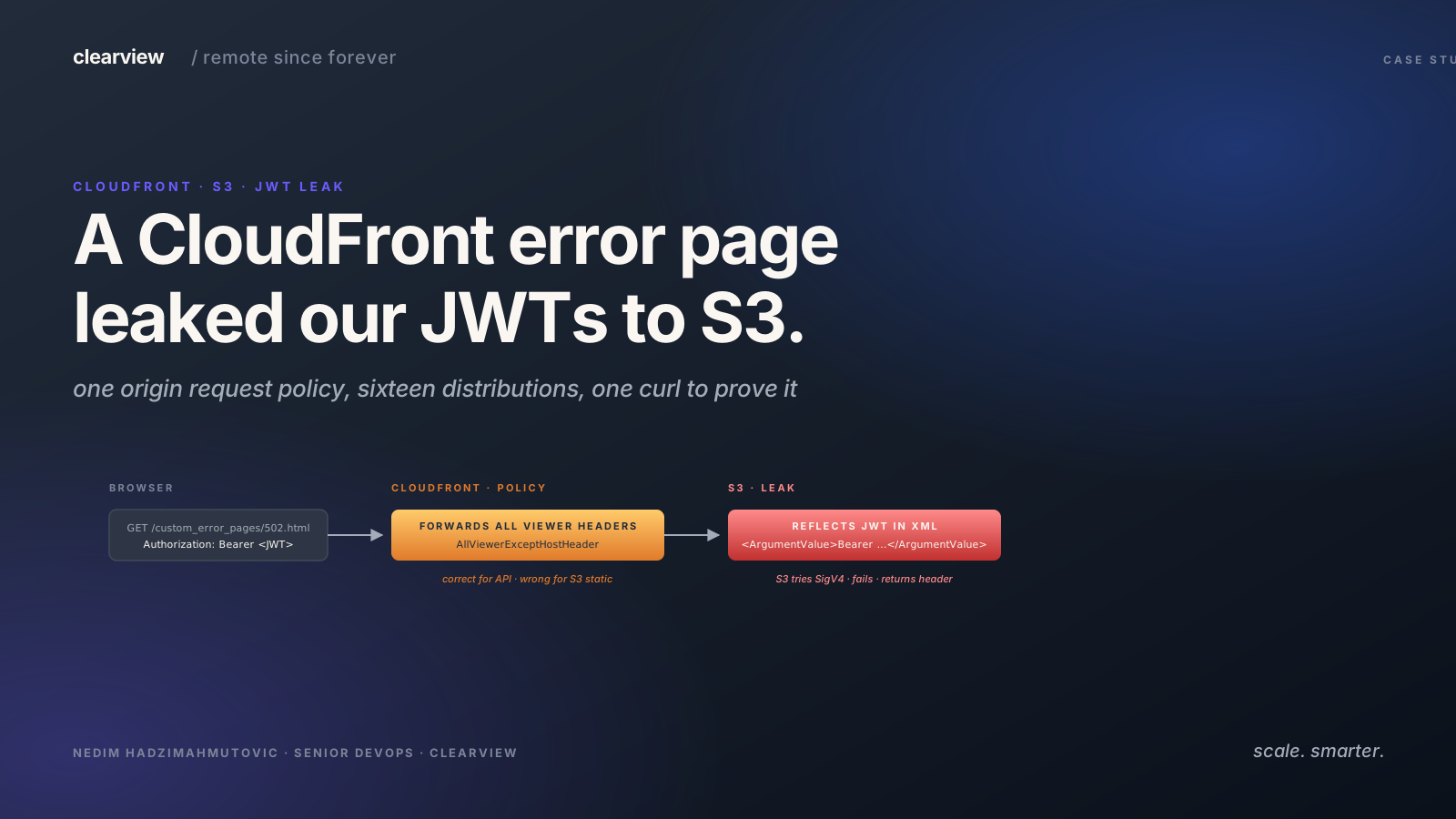

A client was preparing to put an API behind CloudFront in production. During the final penetration test, one curl request showed that every distribution with custom error pages was reflecting users' JWT tokens in S3 XML error responses.
Sixteen distributions shared the same copy-pasted Terraform block.
CloudFront is AWS's content delivery network (CDN). A JSON Web Token (JWT) is the signed session string the API gives a user after login. curl is the command-line tool we use to send HTTP requests by hand. Three terms are enough to follow the finding.
CloudFront was handling TLS at the edge, HTTP/2 and HTTP/3 connections, DDoS protection, and branded error pages from a separate S3 bucket. The staging setup had been running for weeks. The distributions were stable, the error pages rendered correctly, and the TLS grades looked good.
The One-Line Proof
curl https://your-api.example.com/custom_error_pages/502.html \
  -H "Authorization: Bearer eyJhbGciOiJIUzI1NiJ9.YOUR_ACTUAL_TOKEN"
If your response looks like this, you're vulnerable:
<?xml version="1.0" encoding="UTF-8"?>
<Error>
  <Code>InvalidArgument</Code>
  <Message>Unsupported Authorization Type</Message>
  <ArgumentName>Authorization</ArgumentName>
  <ArgumentValue>Bearer eyJhbGciOiJIUzI1NiJ9.YOUR_ACTUAL_TOKEN</ArgumentValue>
</Error>
Your full JWT (user ID, email, role, expiry, everything in the payload) reflected back in an S3 XML error response. The path exists on practically every CloudFront distribution with custom error pages. Any GET request with an Authorization header triggers it, no authentication and no origin failure required.
S3 reflects any Authorization scheme, not just Bearer. Basic auth credentials (Basic dXNlcjpwYXNzd29yZA==), API tokens (Token API_TOKEN_VALUE), anything non-AWS gets dumped into the XML. If your API uses any of these, the same leak applies.
Cookies, X-API-Key, and custom headers are forwarded to S3 too but not reflected in the XML. S3 only complains about the one header it tries to parse.
Why did CloudFront forward the Authorization header to S3?
A CloudFront distribution sits between users and one or more origins (the actual servers that hold your content). Each origin gets a behavior that tells CloudFront which requests to route there and what to forward along.
In this pattern, there are two origins behind one distribution:
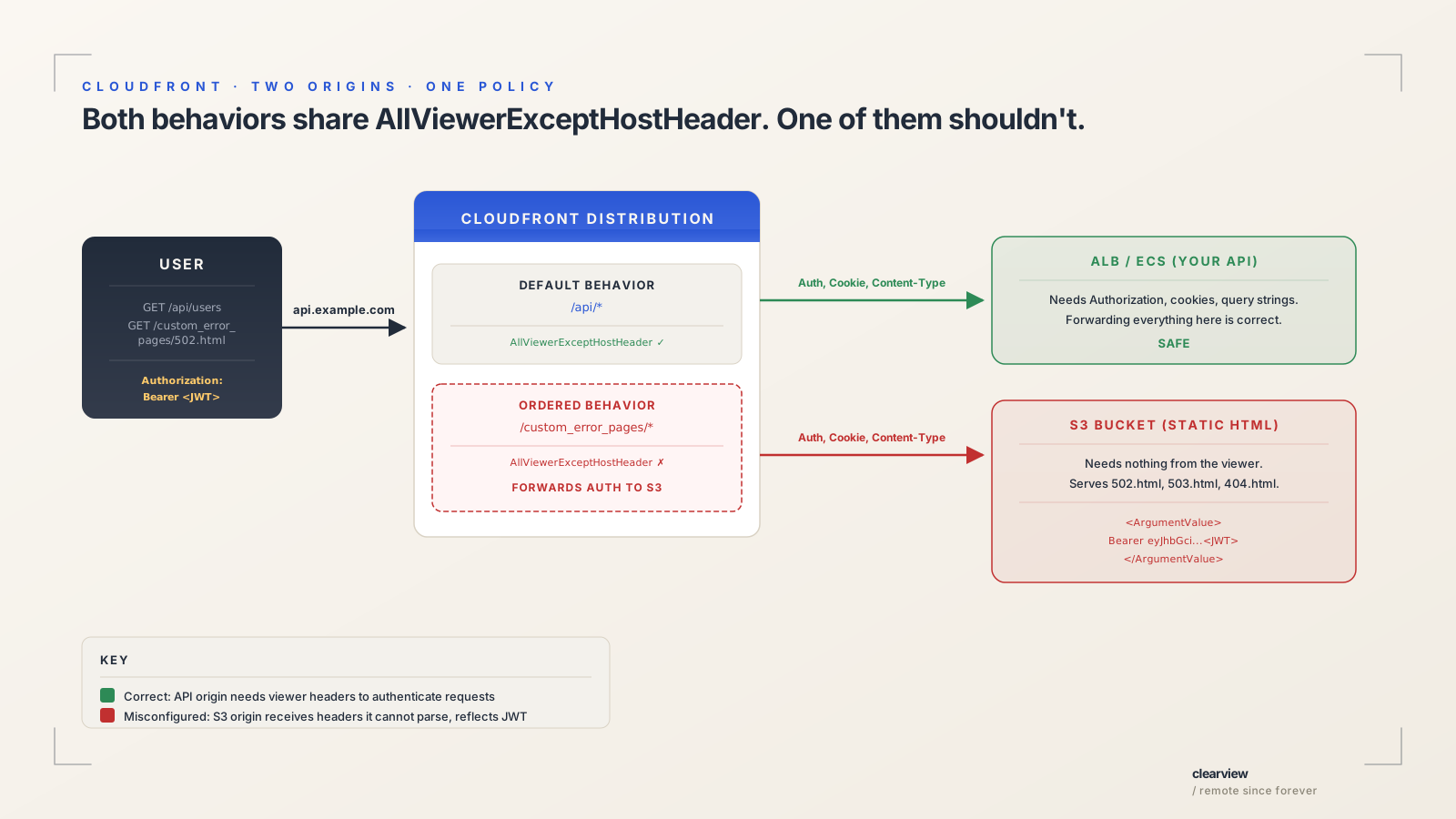
The API origin is your application: an Application Load Balancer (ALB) in front of Elastic Container Service (ECS) containers, a Lambda function, or an EC2 instance. It needs the viewer's Authorization header to authenticate requests, Content-Type to parse bodies, and cookies for sessions. Forwarding everything to this origin is correct.
The error page origin is an S3 bucket containing three static HTML files: 502.html, 503.html, and 404.html. It serves the same branded "We'll be right back" page to every user regardless of who they are.
It needs nothing from the viewer: not their identity, not their cookies, not their query strings. It just needs CloudFront to ask for a file by path, and it returns the HTML.
The problem is that both origins were given the same origin request policy: the one designed for the API. So when CloudFront routes a request to the S3 error page bucket, it sends along everything the viewer included, including Authorization: Bearer <JWT>.
S3 is not your API. It doesn't understand Bearer tokens. It tries to interpret the Authorization header as AWS Signature Version 4, fails, and returns an XML error that includes the header value it couldn't parse. Your JWT is now in the response body.
The setup looks like this in Terraform (CloudFormation and the console follow the same pattern):
# Origin 1: Your API (ALB, ECS, Lambda, etc.)
origin {
  domain_name = aws_lb.api.dns_name
  origin_id   = "api"
}

# Origin 2: S3 bucket with static error pages
origin {
  domain_name = aws_s3_bucket.error_pages.website_endpoint
  origin_id   = "error-pages"
}

# When the API returns 502, serve the S3 error page instead
custom_error_response {
  error_code         = 502
  response_page_path = "/custom_error_pages/502.html"
}

# Behavior for the API (default): forwards all viewer headers
default_cache_behavior {
  target_origin_id         = "api"
  origin_request_policy_id = aws_cloudfront_origin_request_policy.AllViewerExceptHostHeader.id
}

# Behavior for the error pages: ALSO forwards all viewer headers
ordered_cache_behavior {
  path_pattern             = "/custom_error_pages/*"
  target_origin_id         = "error-pages"
  origin_request_policy_id = aws_cloudfront_origin_request_policy.AllViewerExceptHostHeader.id
  # ↑ THIS IS THE PROBLEM
}
The AllViewerExceptHostHeader policy tells CloudFront: "forward every header the viewer sent (Authorization, Cookie, X-Custom-Whatever) to the origin, except Host." That's correct for the API behavior, where your backend needs those headers. It's catastrophically wrong for the error page behavior, where the origin is an S3 bucket serving static HTML.
Three ways the token leaks
The error page path isn't linked anywhere. No browser navigates to /custom_error_pages/502.html during normal use. Three practical routes still reach it.
The path is trivially discoverable by scanners. It's in CloudFront's own documentation examples, and tools like ffuf, feroxbuster, and nuclei include /error/, /custom_error_pages/, and /502.html in their default wordlists. A scanner that hits the path and sees <Code>InvalidArgument</Code> with <ArgumentName>Authorization</ArgumentName> in the XML response can identify the misconfiguration from the shape alone. Our pentest tooling found this one that way.
A production outage can leak the token without any scanner. When the origin returns 502/503, CloudFront intercepts the error and fetches the S3 error page with the original request's Authorization header attached. The user didn't navigate to the error page; CloudFront sent them there. Their token leaks through a normal deployment, container restart, or scaling event, visible in the response body to any browser extension, corporate proxy, or compromised CDN edge watching that window.
| Path | Trigger | Result |
|---|---|---|
| Direct access | A GET request with an Authorization header reaches /custom_error_pages/502.html. |
S3 reflects the header in XML. No origin failure is needed. |
| Origin failure | An API request carries a JWT, then the origin returns 502 or 503. | CloudFront fetches the S3 error page with the original headers, and the token comes back to the user. |
| Plain HTTP | The error-page behavior uses viewer_protocol_policy = "allow-all". |
A network attacker can read the token without breaking its cryptography. |
Most of the distributions we audited had the plain-HTTP setting. The API behavior used redirect-to-https; the error-page behavior was a separate block with separate settings.
The Terraform Template Problem
We found this in a client's infrastructure codebase. We audited every CloudFront distribution across their staging and production accounts. The same ordered_cache_behavior block for /custom_error_pages/* showed up on distribution after distribution, all pointing to the same S3 error pages bucket, all using AllViewerExceptHostHeader.
The block was written once for the API distribution, where it was correct. Then it was copied to every other distribution (SPAs, admin dashboards, static sites, upload CDNs) because it "worked" and nobody questioned whether a static error page bucket needed to receive the viewer's Authorization header.
Terraform's copy-paste turned one mistake into a pattern across the whole account.
A handful of the affected distributions served authenticated traffic (APIs and legacy apps). Those were fully exploitable: every authenticated request that hit a 502 leaked the caller's JWT. The rest served static frontends that don't normally receive Authorization headers, but the direct-access path still worked on all of them.
The Chain That Made It Critical
The JWT leak alone is a HIGH: you can capture a token and replay it for the remaining access-token lifetime. But during this engagement, we found it chained with something else that pushed it to CRITICAL.
The API signs session tokens with a JWT secret. On staging, that secret was hardcoded as a trivially guessable value in the ECS task definition's plaintext environment block. Not in Secrets Manager, not pulled from SSM Parameter Store, just a short, dictionary-word string sitting in Terraform.
We confirmed the secret remotely without any internal access. The API returns different error messages depending on whether a token's signature verifies:
# Token signed with the guessable secret (correct):
curl -X POST https://api.staging.example.com/api/session/token \
  -H "Cookie: session=<forged-token-signed-with-guessable-secret>"
# → "Session has been revoked" (signature PASSED, DB hash lookup failed)

# Token signed with wrong secret:
curl -X POST https://api.staging.example.com/api/session/token \
  -H "Cookie: session=<token-with-wrong-signature>"
# → "Invalid session" (signature FAILED)
That error difference acts as an oracle. "Session has been revoked" means the JWT signature verified successfully; the server moved past cryptographic verification to the database lookup phase. "Invalid session" means the signature check failed. The two code paths are distinguishable remotely.
We proved the full chain end-to-end
We registered a test account and signed in. We captured the session token, leaked it through the error page, and validated it offline. Then we replayed it and had the account. All with curl.
Step 1: Sign in. We registered a test account and signed in. The server set an httpOnly session cookie. It was a long-lived JWT signed with the guessable secret.
Step 2: Leak the token. We sent a GET request to the error page path. The session token was in the Authorization header. The S3 XML error returned it verbatim. Byte for byte, it matched the original.
Step 3: Validate offline. We computed the HMAC-SHA256 signature using the guessable secret. It matched the token's signature exactly. No server interaction needed. The attacker now knows the token is real, who it belongs to, and when it expires.
Step 4: Replay. We sent the leaked session token to the token endpoint. The server verified the JWT signature (passed) and looked up the token hash (found a real active session). It minted a fresh access token.
Step 5: Account takeover. We used the fresh access token to call the user-profile endpoint. The server returned the full profile: ID, email, name, role, all PII fields. Full account access with no password. All from a token that was never meant to leave the httpOnly cookie jar.
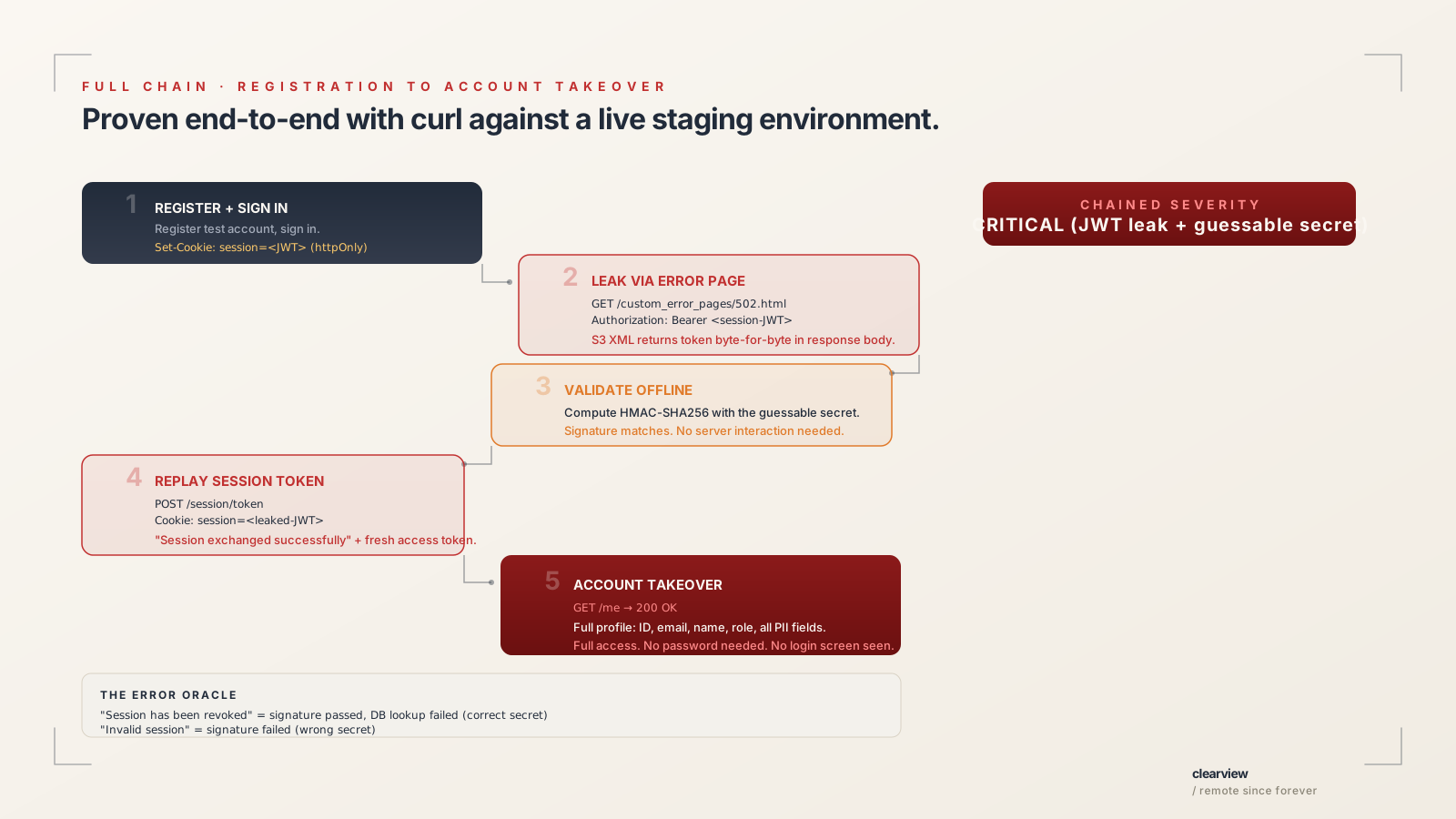
We ran the entire chain with curl against a live staging environment. We didn't need source code access to exploit it. We only needed it to discover the hardcoded secret in Terraform. An external attacker reaches the same outcome by guessing the secret or by intercepting a token through the error page leak.
The public bucket
The bucket is also enumerable:
curl https://your-error-pages-bucket.s3.amazonaws.com/
Returns a full ListBucketResult XML with every file, size, ETag, and last-modified timestamp, no authentication required.
It's public because the error page origin uses an S3 website endpoint, which forces public read access. OAC (Origin Access Control) only works with the REST API endpoint. The pages themselves are benign HTML, but the bucket is one IAM policy drift away from attacker-writable: a phishing form in a 502 page would be served by your own domain, from your own CloudFront distribution, with your own TLS certificate.
The Fix
The error page behavior serves static HTML from S3. It doesn't need the viewer's auth token, cookies, query strings, or any other header.
When you omit origin_request_policy_id entirely, CloudFront sends only the minimum required headers to the origin. That is enough for an S3 website endpoint to fetch a file by path, and there is nothing left for S3 to reflect back.
The simplest fix is to delete the origin_request_policy_id line from every error page behavior. It shouldn't have been there in the first place.
But if you want to be explicit about the intent (and make it harder for someone to re-add a permissive policy later thinking it was accidentally removed), define a policy that forwards nothing:
resource "aws_cloudfront_origin_request_policy" "ErrorPagesNoAuth" {
  name    = "ErrorPages-NoAuth"
  comment = "Error pages are static HTML, no viewer headers needed"

  headers_config {
    header_behavior = "none"
  }
  cookies_config {
    cookie_behavior = "none"
  }
  query_strings_config {
    query_string_behavior = "none"
  }
}
Then in every ordered_cache_behavior for /custom_error_pages/*:
ordered_cache_behavior {
  path_pattern             = "/custom_error_pages/*"
  target_origin_id         = "error-pages"
  origin_request_policy_id = aws_cloudfront_origin_request_policy.ErrorPagesNoAuth.id
  viewer_protocol_policy   = "redirect-to-https"
  # ... rest unchanged
}
Verification:
# Before fix:
curl https://your-api.com/custom_error_pages/502.html \
  -H "Authorization: Bearer TEST"
# → <ArgumentValue>Bearer TEST</ArgumentValue>  ← LEAKED

# After fix:
curl https://your-api.com/custom_error_pages/502.html \
  -H "Authorization: Bearer TEST"
# → <!DOCTYPE html><html>...(your 502 page HTML)...  ← SAFE
For defense in depth:
- Switch the S3 origin from a public website endpoint to a private bucket with OAC. This closes the public listing vulnerability and eliminates the unencrypted HTTP origin protocol.
- Set
error_caching_min_ttl = 0so error responses aren't cached at all. - Set
viewer_protocol_policy = "redirect-to-https"on the error page behavior so the path can't be accessed over plain HTTP.
Forwarding headers to error pages is valid when the origin needs the viewer's identity: a Lambda@Edge function rendering personalized error pages, a Cognito-gated bucket, or a debugging service logging which user hit the error. In those cases the origin is an application that can safely consume auth headers. If your error page origin is S3, the answer is always header_behavior = "none".
What we shipped
Sixteen distributions closed. The JWT reflection path is gone across the client's account, and HTTP-to-HTTPS is enforced on every error-page behavior. The one residual risk (the public S3 website endpoint) is on the follow-up list.
How to Check If You're Vulnerable
Step 1: Find your error page path. Look for custom_error_response blocks in your CloudFront distribution. The response_page_path tells you where the error pages live.
Step 2: Send a request with an auth header.
curl -s https://your-domain.com/custom_error_pages/502.html \
  -H "Authorization: Bearer CHECK_THIS_TOKEN"
Step 3: Check the response. If you see <ArgumentValue>Bearer CHECK_THIS_TOKEN</ArgumentValue> in the XML, you're vulnerable. If you see your HTML error page, you're fine. A 403 means the path doesn't exist or the behavior doesn't allow GET, which is also fine.
Step 4: Check all your distributions. If you use the same Terraform module or copy-paste pattern across distributions, check every one. In one engagement we found the majority of distributions sharing the same misconfiguration. The one you check might be fine while a dozen others are leaking.
Check every distribution
Nobody asked whether a static HTML bucket needed the same headers as an authenticated API. If you're running CloudFront with custom S3 error pages, spend sixty seconds running the curl command above against each distribution.
A note on responsible testing: every test account created during this engagement was registered with a non-existent @example.com address, used only for curl-based proof-of-concept, and cleaned up after the findings were documented. No real user sessions were intercepted or replayed. The full chain was proven end-to-end using our own credentials against a staging environment with explicit authorization from the infrastructure owner.