
A client was weeks from going live with their Express API. We had staging access and a brief to check every endpoint the public would be able to reach. The CORS configuration looked clean.
CORS, in one sentence, is the browser's rule about which other websites are allowed to send authenticated requests to your API. Set it too narrow and your own subdomains can't talk to the backend. Set it too wide and any website on the internet can.
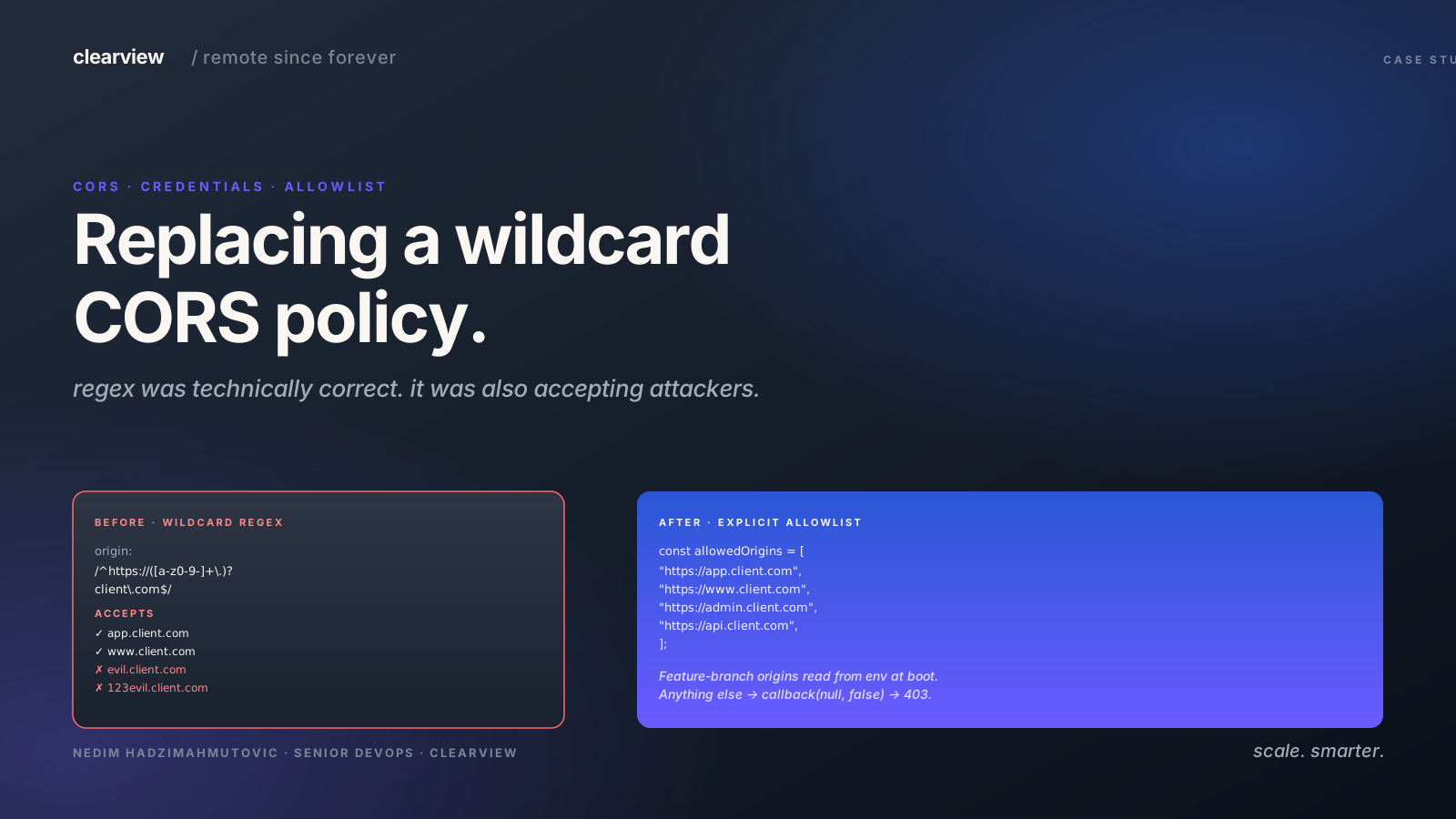
The team had already moved past the obvious mistake of allowing every site on the internet (origin: "*"). Instead, they had written a small text pattern (called a regex) that was meant to allow only the client's own subdomains through.
The regex was the problem.
The rest is the configuration we found, why "matches the regex" is not the same as "is safe to trust," and the explicit allowlist we shipped instead — including the answer every frontend team wants the moment they hear "allowlist": "what happens to our feature-branch preview URLs?"
The Configuration We Found
The CORS middleware was wired up like this:
// cors.config.ts
const corsOptions = {
  origin: /^https:\/\/([a-z0-9-]+\.)?client\.com$/,
  credentials: true,
  methods: ['GET', 'POST', 'PUT', 'DELETE', 'PATCH', 'OPTIONS', 'HEAD'],
};
That regex matches https://X.client.com for any subdomain X made of lowercase letters, digits, and hyphens. It also matches the bare apex domain https://client.com. The team's intent was clear: trust the client's own properties, reject everything else.
What it actually does is accept any subdomain that could be registered or pointed at the client's domain in the future — including ones that do not exist yet and ones that are owned by someone else.
How We Demonstrated the Problem
A quick test from the curl side:
# Legitimate origin — accepted, as expected.
curl -sI "$API/api/config" \
  -H "Origin: https://app.client.com" \
  | grep -i access-control
# access-control-allow-origin: https://app.client.com
# access-control-allow-credentials: true

# A subdomain that does not exist — also accepted.
curl -sI "$API/api/config" \
  -H "Origin: https://anything.client.com" \
  | grep -i access-control
# access-control-allow-origin: https://anything.client.com
# access-control-allow-credentials: true
The middleware reflects the supplied Origin header back as Access-Control-Allow-Origin, and sets Access-Control-Allow-Credentials: true, and accepts the request. The browser will happily send cookies and authorisation headers along with cross-origin requests from any matching subdomain.
CORS with credentials means the browser is authorising the cross-origin destination to act on the user's behalf with their session.
// Imagine this running on evil.client.com — a subdomain registered by an attacker
// after the client lets a wildcard DNS record lapse, or after a takeover.
fetch('https://api.client.com/user/profile', {
  credentials: 'include',
})
  .then((r) => r.json())
  .then((data) => sendToMyServer(data));
The legitimate user is on app.client.com. The malicious code is on evil.client.com. Both match the regex. The browser sends the user's session cookies along. The API returns the profile data. The attacker exfiltrates it.
The Preflight Was Also Verbose
While running the test matrix, we noticed the preflight response was generous:
curl -sI -X OPTIONS "$API/user" \
  -H "Origin: https://evil.client.com" \
  -H "Access-Control-Request-Method: DELETE"
# access-control-allow-methods: GET,POST,PUT,DELETE,PATCH,OPTIONS,HEAD
# access-control-allow-credentials: true
Every HTTP method advertised, credentials allowed. A preflight response is an explicit invitation list — listing methods the application does not even use on most endpoints tells an attacker which verbs to try.
Why This Happens — The Regex Trap
The regex is technically correct for the stated intent: "match any subdomain of client.com." The trap is that "any subdomain" includes subdomains that
- do not exist yet,
- could be registered by an attacker,
- could be taken over via a dangling DNS record,
- could be pointed at attacker-controlled infrastructure if a wildcard DNS entry is misconfigured.
Regex CORS configurations are routinely flagged because they conflate syntactic match with semantic trust. The regex says "the name looks right." It cannot say "the name is owned by us."
The Fix We Shipped — An Explicit Allowlist
We replaced the regex with a list of strings:
// cors.config.ts
const allowedOrigins = [
  'https://app.client.com',
  'https://www.client.com',
  'https://admin.client.com',
  'https://api.client.com',
];

// Feature-branch deployments add origins via env var at boot.
const featureBranchOrigins =
  process.env.FEATURE_BRANCH_ORIGINS?.split(',').filter(Boolean) ?? [];

const corsOptions = {
  origin: (origin, callback) => {
    if (!origin) {
      // Same-origin and curl/server-to-server have no Origin header.
      // Accept them — they are not browser cross-origin requests.
      return callback(null, true);
    }
    if (
      allowedOrigins.includes(origin) ||
      featureBranchOrigins.includes(origin)
    ) {
      return callback(null, true);
    }
    return callback(null, false);  // 403, not 500.
  },
  credentials: true,
};
Four properties on the allowlist by default. Feature branches plug in through an environment variable — the deployment pipeline appends the preview URL to FEATURE_BRANCH_ORIGINS when it provisions a branch deployment, and removes it when the branch is torn down.
Three things to note about the callback form:
callback(null, false)is the rejection path — the middleware returns a403instead of letting an exception bubble up to a500. The application no longer leaks the existence of the endpoint to non-allowlisted origins.- The empty-origin case is explicit. Curl and server-to-server callers do not send an Origin header. Treating them as allowed prevents internal jobs from breaking when the same API serves machine traffic.
- The
credentials: trueflag is still on — that is correct because the allowlist is now strict.
What We Had To Fix Alongside CORS
The middleware previously threw an Error on unknown origins:
// Previously
if (!isAllowed) throw new Error('Not allowed by CORS');
Throwing inside the CORS middleware turns a "denied" outcome into a 500 Internal Server Error from Express's default error handler. That tells the attacker the endpoint exists and is doing something interesting. The new callback path returns a clean 403, and the error handler stays out of it.
The Feature-Branch Conversation
The frontend team's first response was the one we expect on every engagement that touches CORS:
"But we need dynamic subdomains for feature branches. We cannot maintain a list."
The list is not maintained by hand — it is maintained by the deployment pipeline.
- When a branch deployment is created, the pipeline appends its origin (e.g.
https://branch-1234.preview.client.com) toFEATURE_BRANCH_ORIGINSin the API's environment. - When the branch is torn down or merged, the pipeline removes it.
- The API restarts on env change. Cold start is sub-second; the redeploy is a non-event.
The result is the same flexibility the regex used to give — any branch can talk to the API — without giving the same flexibility to anyone who can register any subdomain.
Verifying After the Change
The reproduction script we ran before the fix returns clean results afterwards:
# 1. Legitimate origin — still works
curl -sI "$API/api/config" \
  -H "Origin: https://app.client.com" \
  | grep -i access-control
# access-control-allow-origin: https://app.client.com
# access-control-allow-credentials: true

# 2. Unknown subdomain — no allow-origin header at all
curl -sI "$API/api/config" \
  -H "Origin: https://evil.client.com" \
  | grep -i access-control
# (no output — header not set)

# 3. Status code for blocked preflight — 403, not 500
curl -s -o /dev/null -w "%{http_code}\n" -X OPTIONS "$API/api/config" \
  -H "Origin: https://evil.client.com" \
  -H "Access-Control-Request-Method: GET"
# 403
The browser, on the legitimate side, sees the same response as before. The browser, on the attacker side, sees a CORS error and never gets to the response body.
What We Added Alongside CORS — The Layered Story
CORS is a browser policy. A determined attacker can still hit the API directly without a browser. Three companion changes shipped alongside the allowlist:
- Allowed methods narrowed per endpoint. The middleware no longer advertises
DELETEon endpoints that do not support it. Each route declares its own method set. - JWT validation on every authenticated request. A separate audience check — covered in its own case study — runs alongside CORS. Even on the days CORS gets misconfigured again, the audience check holds.
- Origin telemetry. We log every rejected origin to CloudWatch with a 30-day retention window. If a hostname starts showing up, the team sees it before it shows up in a support ticket.
Five things we now check on every CORS engagement
- Regex CORS allowlists are almost always wrong. The string form is more verbose but it is also unambiguous. Add a linter rule that fails the build on a non-string
cors.originvalue. - Wildcard subdomain regex matches subdomains you do not control. If you do not own every subdomain of your apex, the regex hands trust to whoever does.
callback(null, false)is the rejection path. Throwing inside CORS middleware turns a 403 into a 500 and tells the attacker something interesting happened.- Feature branches do not need wildcard CORS. A pipeline that updates an
FEATURE_BRANCH_ORIGINSenv var on create and tear-down delivers the same DX without the security gap. - Tighten
Access-Control-Allow-Methodsper route. A blanket method allowlist is an open menu of verbs for an attacker to probe. Routes declare the verbs they accept; the middleware reflects only those.