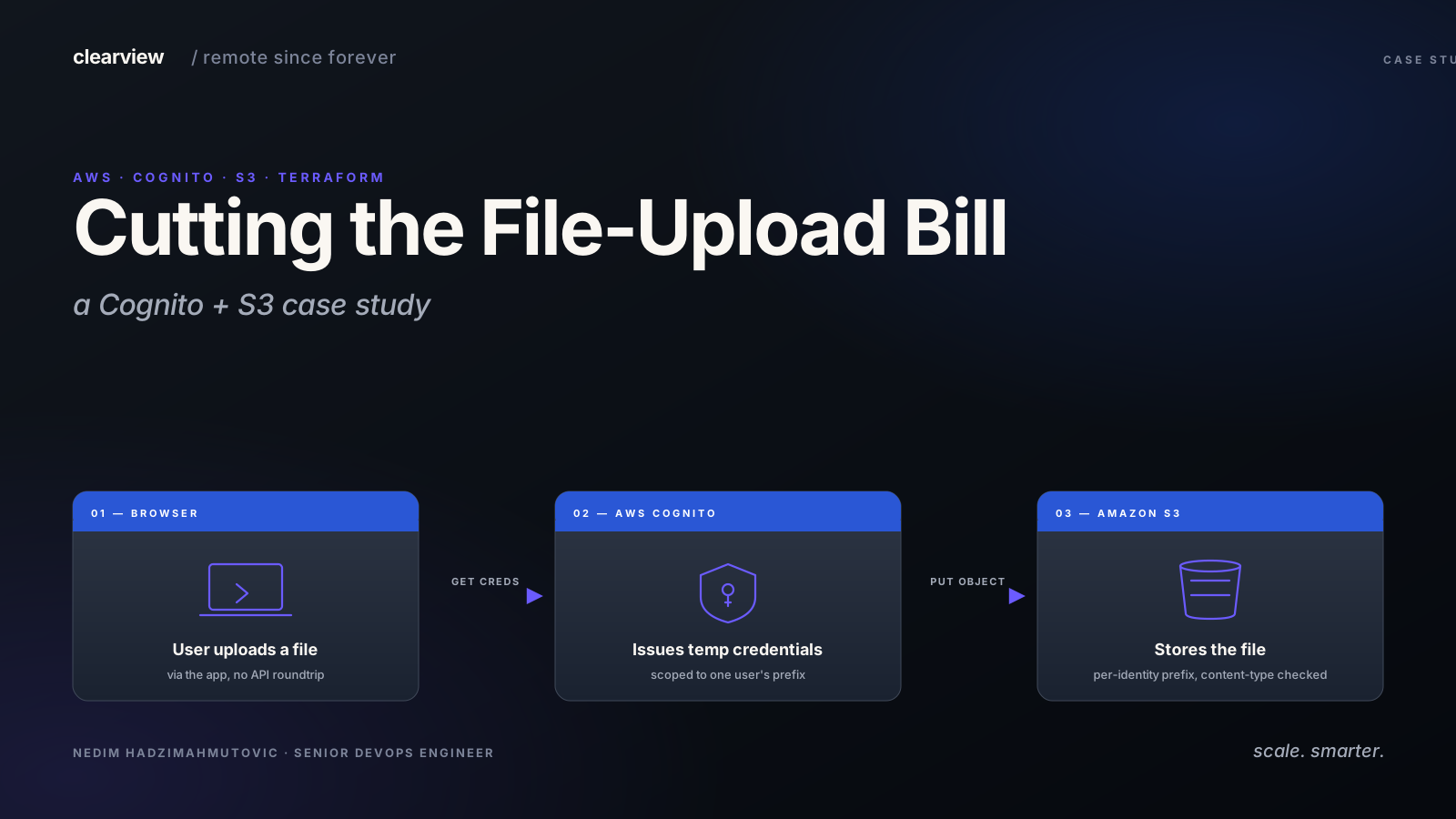

The client had a managed file-upload service in their browser, the kind that gives you a hosted widget, signs every upload, runs a virus scan, and bills you per request. It worked, and the team liked the developer experience. The CFO did not like the invoice.
The obvious question was whether we could replace it with all native AWS services and keep the same browser-direct upload pattern. Yes, with a Cognito + S3 setup. We built a three-layer permission model that most Cognito-on-S3 tutorials skip, which is why they leak.
Two AWS services do the work here, both worth one sentence each before we go further:
- S3 — AWS's object-storage service. The bucket the files actually land in. Cheap, durable, billed per gigabyte stored and per request.
- Cognito Identity Pool — AWS's way of handing a browser a short-lived AWS credential so it can talk to S3 directly, without an API server in the middle. The "boundary" the rest of this post tightens.
What the Frontend Had to Do
The browser uploads files directly to storage — never through the backend API. This pattern matters for two reasons:
- Throughput. A 200 MB upload doesn't tie up a backend worker for two minutes.
- Cost. Backend egress through the API doubles the bandwidth bill.
The managed service handled this with a hosted SDK: the browser calls the service, gets a one-shot signed URL, uploads to the vendor's S3, and the vendor pushes the object into the client's bucket via a webhook. Clean DX. Big invoice.
What we needed to replicate:
- Browser uploads directly to the client's S3 bucket
- No long-lived AWS credentials in the browser
- Per-user isolation (user A cannot read or overwrite user B's files)
- Content-type and size guards
- Anti-abuse layer for anonymous (pre-signup) uploads
The Architecture
The pattern is well-known: AWS Cognito Identity Pool → temporary AWS credentials → direct PUT to S3. AWS Amplify ships this same architecture as defineStorage, which gives us a useful reference point.
The flow on a happy path:
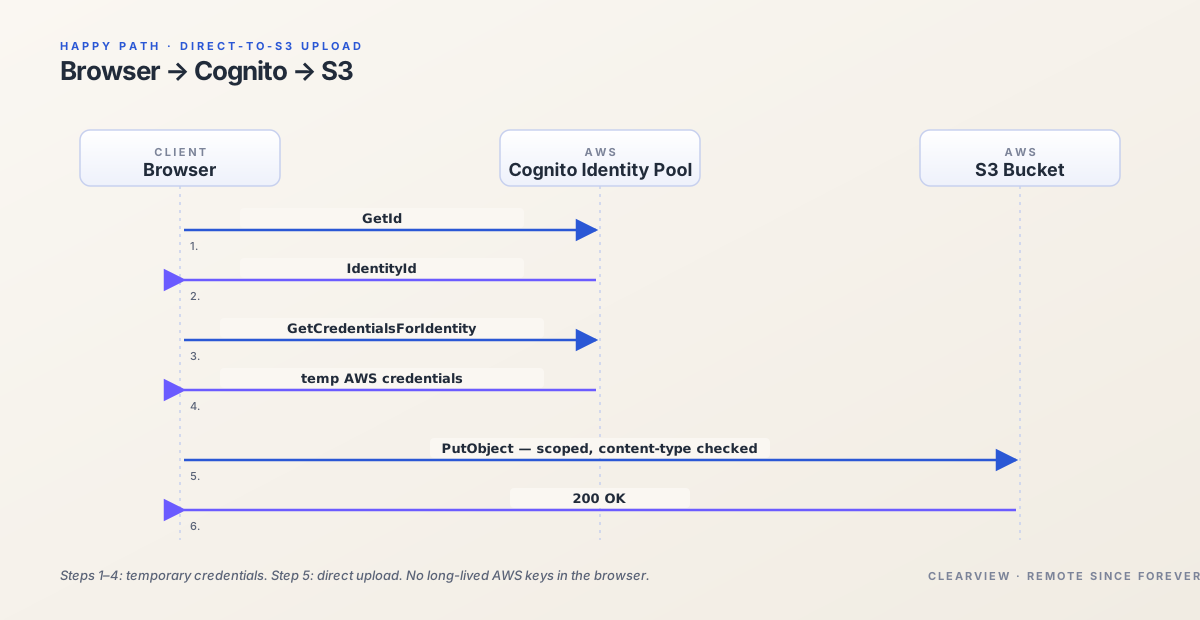
The whole thing lives in three Terraform files: cognito.tf, s3.tf, and iam.tf. The browser code is roughly thirty lines of @aws-sdk/client-s3 and the standard Cognito credential provider.
The catch — and the reason most Cognito-on-S3 implementations leak — is that three independent layers decide whether a given operation is allowed. Get any one of them wrong and you've either bricked uploads or opened the bucket to the internet.
The Three Layers of Permission Evaluation
This is the mental model we built before writing a single line of Terraform.
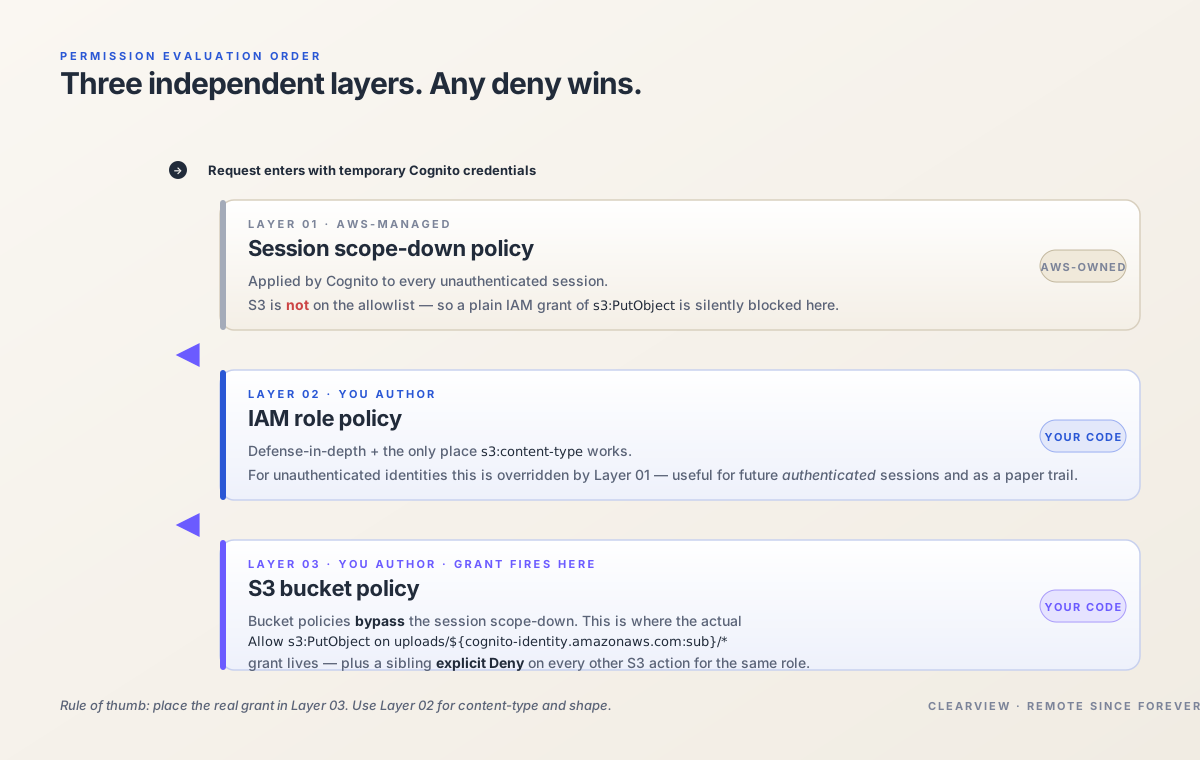
| Layer | What it controls | Where it lives |
|---|---|---|
| Session scope-down policy | Which AWS services unauthenticated credentials can call at all | AmazonCognitoUnAuthedIdentitiesSessionPolicy (AWS-managed) |
| IAM role policy | What actions the role can take on which resources | Attached to the role you create |
| Bucket policy | What principals can do directly to the bucket | Attached to the S3 bucket itself |
The non-obvious behavior:
- The session scope-down for unauthenticated identities does not include S3. So an IAM grant of
s3:PutObjectto the unauthenticated role is silently blocked by the session policy. This trips up everyone the first time. - Bucket policies bypass the session scope-down. A grant of
s3:PutObjectto the Cognito role principal inside the bucket policy is honored. - Therefore: put your real grants in the bucket policy, not the IAM policy (or grant via both for defense in depth — only the bucket-policy grant will actually fire for unauthenticated identities).
Print it out.
The Terraform — Identity Pool
resource "aws_cognito_identity_pool" "uploads" {
  identity_pool_name               = "client-uploads"
  allow_unauthenticated_identities = true
}

resource "aws_cognito_identity_pool_roles_attachment" "uploads" {
  identity_pool_id = aws_cognito_identity_pool.uploads.id
  roles = {
    "unauthenticated" = aws_iam_role.cognito_unauth.arn
  }
}
We do allow unauthenticated identities, because the client's app needs to accept uploads before signup completes. The risk is real, and the rest of the Terraform is how we tightened around it.
The Terraform — IAM Role
The IAM role for the unauthenticated identity gets a minimal trust policy and a permission policy that grants only s3:PutObject to a per-identity prefix. Note: this is a defense-in-depth layer; the actual grant that fires for unauthenticated identities will be the bucket policy below.
data "aws_iam_policy_document" "cognito_unauth_assume" {
  statement {
    actions = ["sts:AssumeRoleWithWebIdentity"]
    principals {
      type        = "Federated"
      identifiers = ["cognito-identity.amazonaws.com"]
    }
    condition {
      test     = "StringEquals"
      variable = "cognito-identity.amazonaws.com:aud"
      values   = [aws_cognito_identity_pool.uploads.id]
    }
    condition {
      test     = "ForAnyValue:StringLike"
      variable = "cognito-identity.amazonaws.com:amr"
      values   = ["unauthenticated"]
    }
  }
}

resource "aws_iam_role" "cognito_unauth" {
  name               = "cognito-uploads-unauth"
  assume_role_policy = data.aws_iam_policy_document.cognito_unauth_assume.json
}

data "aws_iam_policy_document" "cognito_unauth_perms" {
  statement {
    actions   = ["s3:PutObject", "s3:AbortMultipartUpload", "s3:ListMultipartUploadParts"]
    resources = [
      "${aws_s3_bucket.uploads.arn}/uploads/$${cognito-identity.amazonaws.com:sub}/*",
      "${aws_s3_bucket.uploads.arn}/documents/$${cognito-identity.amazonaws.com:sub}/*",
    ]
    condition {
      test     = "StringLike"
      variable = "s3:content-type"
      values   = ["image/*", "video/*", "application/pdf"]
    }
  }
}

resource "aws_iam_role_policy" "cognito_unauth" {
  role   = aws_iam_role.cognito_unauth.id
  policy = data.aws_iam_policy_document.cognito_unauth_perms.json
}
Three constraints, all important:
s3:PutObjectonly. NoGetObject, noDeleteObject, noListBucket. The browser writes; it does not read or enumerate.- Per-identity prefix via
${cognito-identity.amazonaws.com:sub}. AWS interpolates this at request time. User A's credentials can only write touploads/<A's-sub-id>/*. They cannot guess their way into User B's folder. Terraform's$$is the escape for AWS template syntax — easy to miss the first time. s3:content-typeallowlist. The browser declares the content type; AWS checks it before accepting the PUT.text/htmlis denied at the IAM boundary. (Note:s3:content-typeworks in IAM policies but not in bucket policies — keep this one here.)
The Terraform — Bucket and Bucket Policy
Because the session scope-down blocks the IAM grant for unauthenticated identities, the actual PutObject allow has to live in the bucket policy:
resource "aws_s3_bucket" "uploads" {
  bucket = "client-uploads-prod"
}

resource "aws_s3_bucket_public_access_block" "uploads" {
  bucket                  = aws_s3_bucket.uploads.id
  block_public_acls       = true
  block_public_policy     = true
  ignore_public_acls      = true
  restrict_public_buckets = true
}

resource "aws_s3_bucket_versioning" "uploads" {
  bucket = aws_s3_bucket.uploads.id
  versioning_configuration { status = "Enabled" }
}

data "aws_iam_policy_document" "uploads_bucket_policy" {
  # The grant that actually fires for unauthenticated Cognito identities.
  statement {
    sid       = "AllowScopedUploads"
    effect    = "Allow"
    actions   = ["s3:PutObject", "s3:AbortMultipartUpload"]
    principals {
      type        = "AWS"
      identifiers = [aws_iam_role.cognito_unauth.arn]
    }
    resources = [
      "${aws_s3_bucket.uploads.arn}/uploads/$${cognito-identity.amazonaws.com:sub}/*",
      "${aws_s3_bucket.uploads.arn}/documents/$${cognito-identity.amazonaws.com:sub}/*",
    ]
  }

  # Deny everything else, explicitly, for the Cognito role.
  statement {
    sid       = "DenyEverythingElse"
    effect    = "Deny"
    actions = [
      "s3:GetObject", "s3:DeleteObject", "s3:ListBucket",
      "s3:ListBucketVersions", "s3:ListBucketMultipartUploads",
    ]
    principals {
      type        = "AWS"
      identifiers = [aws_iam_role.cognito_unauth.arn]
    }
    resources = [
      aws_s3_bucket.uploads.arn,
      "${aws_s3_bucket.uploads.arn}/*",
    ]
  }
}

resource "aws_s3_bucket_policy" "uploads" {
  bucket = aws_s3_bucket.uploads.id
  policy = data.aws_iam_policy_document.uploads_bucket_policy.json
}
block_public_acls plus block_public_policy mean the bucket can never accidentally drift to "world-readable" — even if a future engineer adds a Principal: * statement, AWS rejects the policy at apply time.
Verifying With curl
Before handing off, we validated the boundary the same way an attacker would — with curl and no SDK in between.
# 1. Get an anonymous identity.
curl -s -X POST "https://cognito-identity.us-east-1.amazonaws.com/" \
  -H "Content-Type: application/x-amz-json-1.1" \
  -H "X-Amz-Target: AWSCognitoIdentityService.GetId" \
  -d '{"IdentityPoolId":"us-east-1:xxxxxxxx-xxxx-xxxx-xxxx-xxxxxxxxxxxx"}'

# 2. Exchange it for temporary AWS credentials.
curl -s -X POST "https://cognito-identity.us-east-1.amazonaws.com/" \
  -H "Content-Type: application/x-amz-json-1.1" \
  -H "X-Amz-Target: AWSCognitoIdentityService.GetCredentialsForIdentity" \
  -d '{"IdentityId":"us-east-1:yyyyyyyy-..."}'
We then exported the credentials and ran the matrix of operations our policy is supposed to block:
# Reads — denied
aws s3 cp s3://client-uploads-prod/uploads/foo/bar.jpg /tmp/x
# An error occurred (AccessDenied) ...

# Listing — denied
aws s3 ls s3://client-uploads-prod/
# An error occurred (AccessDenied) ...

# Deletes — denied
aws s3 rm s3://client-uploads-prod/uploads/foo/bar.jpg
# An error occurred (AccessDenied) ...

# Writing outside your own prefix — denied
echo "x" | aws s3 cp - s3://client-uploads-prod/uploads/somebody-else/file.txt
# An error occurred (AccessDenied) ...

# Writing wrong content type to your own prefix — denied
aws s3 cp evil.html s3://client-uploads-prod/uploads/$MY_SUB/evil.html \
  --content-type "text/html"
# An error occurred (AccessDenied) ...

# Writing the right content type to your own prefix — allowed
aws s3 cp ok.jpg s3://client-uploads-prod/uploads/$MY_SUB/ok.jpg
# upload: ./ok.jpg to s3://client-uploads-prod/...
Every line in that matrix is part of the acceptance test. We re-run it in CI against staging on every Terraform change.
What We Added Back From the Managed Service
Replacing a managed service means rebuilding the safety net the vendor wrapped around the happy path. Three pieces in particular needed deliberate replacement.
1. File-size limits and content-type validation, properly
The IAM-level s3:content-type check trusts the header — easy to spoof. We added a Lambda triggered by s3:ObjectCreated:* that:
- Reads the first 16 bytes of the new object (
magic bytes) - Matches against an allowlist of file signatures (JPEG, PNG, MP4, PDF…)
- Deletes the object and writes a
denied/<sub>/<timestamp>.logaudit entry if the magic bytes do not match the prefix policy
This is the same defense-in-depth pattern the managed service used; we now own it.
2. Anti-abuse for guest uploads
For genuinely anonymous flows (pre-signup), we put a small backend endpoint in front. The browser proves it is a human with reCAPTCHA, the backend validates the token, and only then does the frontend get to call GetCredentialsForIdentity. This converts "anyone can get AWS credentials" into "any verified human can get AWS credentials" — the bar we wanted.
3. Bucket abuse limits
We layered in two things the managed service used to do for us:
- S3 Lifecycle rule that deletes anything in
uploads/$sub/older than 30 days unless the object has been promoted (a tag set when the user completes signup). - CloudWatch alarm on
BucketSizeBytesand onNumberOfObjectsper prefix, with thresholds set at 5× the 30-day rolling average. A bored teenager filling the bucket with zeros sets off the alarm before it sets off the invoice.
Migration Plan (No Downtime)
We rolled this out in three phases over two sprints. The client never lost an upload.
- Dual-write. Frontend hits the managed service and the new Cognito flow in parallel. Compare file hashes in the backend. Surface any mismatch in a Slack channel.
- Read switch. Once dual-write was clean for two weeks, the application started reading from S3. The managed service's pipeline stayed running, but downstream consumers stopped touching it.
- Cutover. Frontend disables the managed-service call. Vendor account moved to "evergreen" tier. After 60 days of clean operation we cancelled the contract.
What the Client Walked Away With
In rough numbers (exact figures live in the client's invoice records, not ours):
- The monthly bill dropped sharply. Most of the savings came from the dominant cost shifting from "you pay per upload" to "you pay per gigabyte stored" — and on this workload, per-GB storage on S3 is a fraction of what the managed service was charging per request.
- They own the pipeline now. The whole upload pipeline lives in their own Terraform repository. If they ever want to swap a piece out, they can.
- They can do things the managed service did not let them do. Their backend can now sign upload URLs based on any business rule they care about — has the user finished signup, are they on a paid plan, what country are they in. None of that was possible before.
- The boundary is tighter than the tutorial version. Per-user prefixes, magic-byte validation, abuse alarms, versioning so we can undo a bad upload, CloudTrail data events on every S3 operation. The kind of plumbing that gets noticed only when something tries to abuse it.
The client's reaction, paraphrased: "This is the architecture we wished the vendor's docs had explained in the first place."
Two gotchas the tutorials skip
First, s3:prefix only applies to s3:ListBucket, not to s3:ListBucketMultipartUploads — split them into separate statements or AWS rejects the policy at apply time. Second, SDK helpers like --dryrun check client-side logic only; they do not call AWS IAM. Test the deny path with curl and the AWS CLI directly, or the acceptance test is lying to you.
Two things I would enable from day one on the next build: versioning on the bucket, so a bad upload is one command away from being undone, and CloudTrail data events, so the forensic answer to "what did the temporary credential actually do" is available at all.