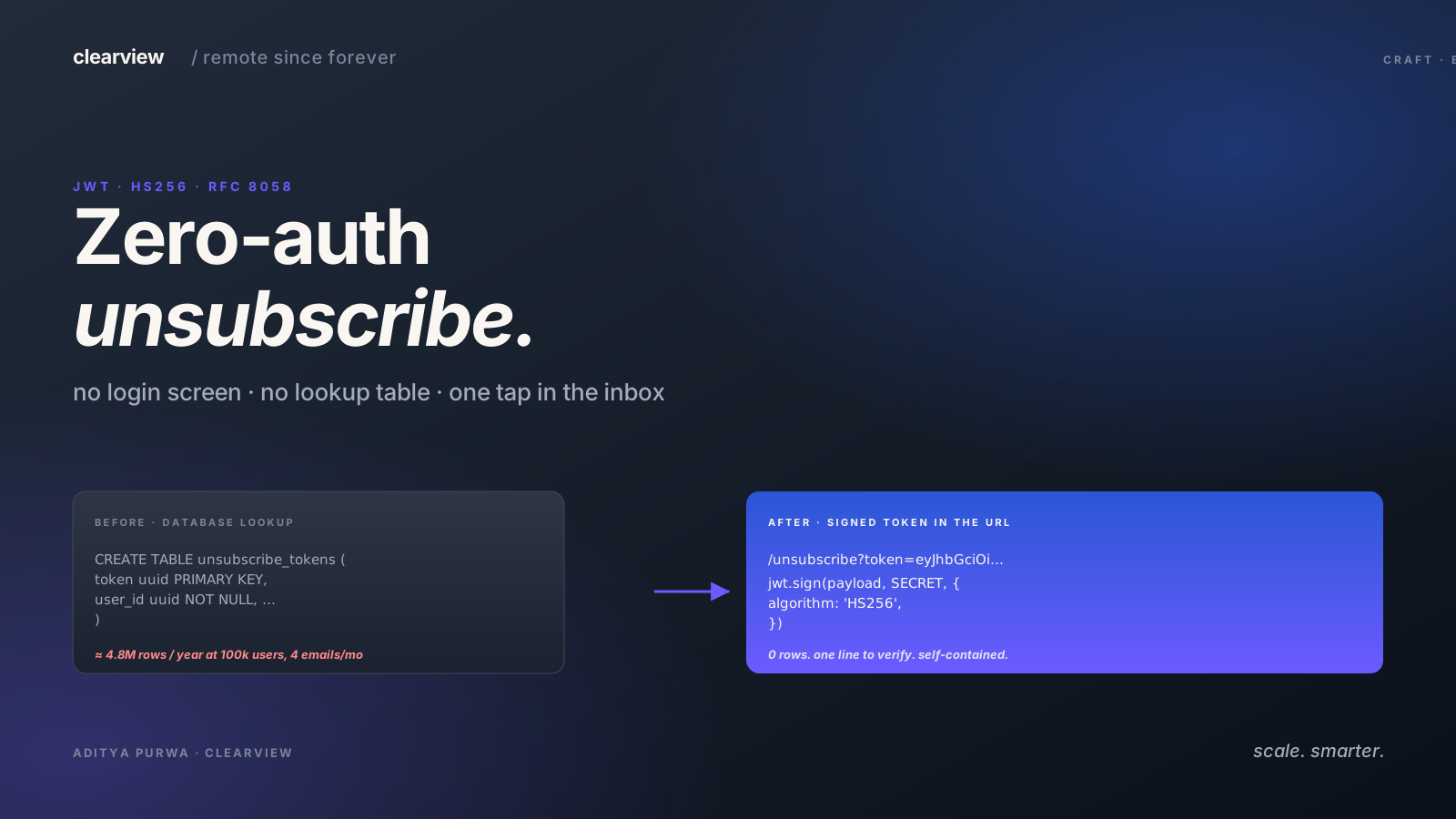

How often you receive an email that has no unsubscribe link at the bottom and then gets annoyed because you can't stop receiving this email and you end up with 314.159.265 unread emails?
Probably not often because unsubscription is now something that you have to legally think of, especially if you send marketing emails.
So how do you implement an unsubscribe link that is highly accessible, doesn't require any login, secure and unspoofable, and respect the RFC 8058 so that most email clients can automatically unsubscribe the user using your link? An email that respect your user so that they won't tap on that "Mark as spam" instead; and an email that won't trigger accidental unsubscribe because the email client crawls through every link to check for viruses.
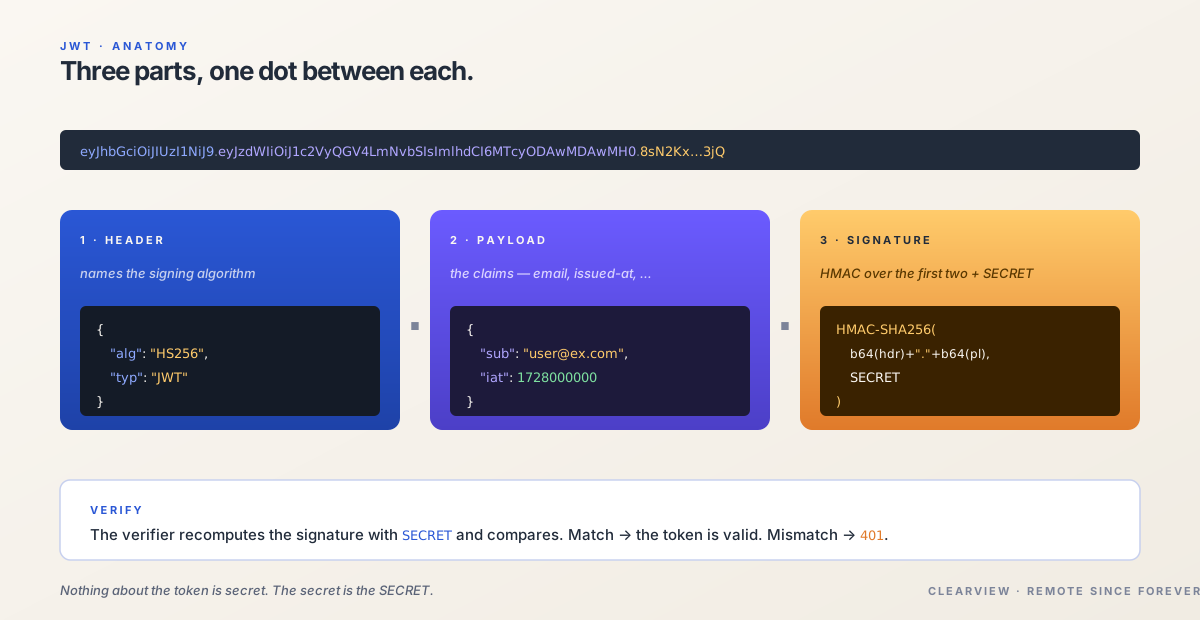
- JWT
- JSON Web Token. A signed string with three parts (header, payload, signature) separated by dots.
- HMAC · HS256
- A keyed hash. A shared secret plus the payload produces a signature that only holders of the secret can create.
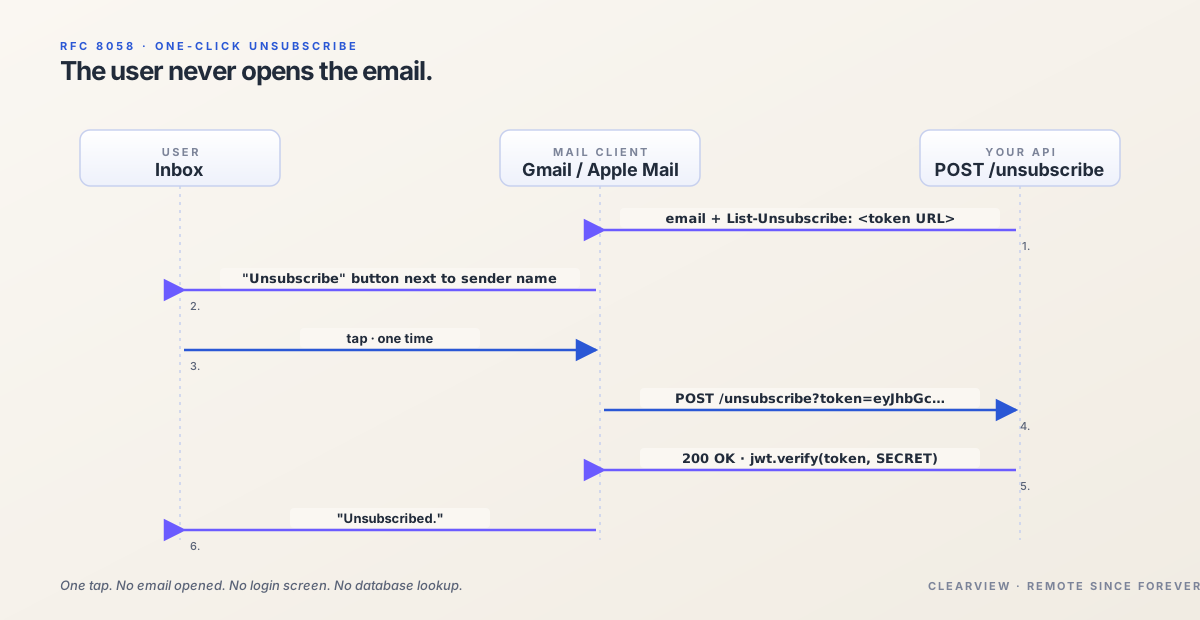
- RFC 8058
- The "one-click unsubscribe" standard that Gmail and Apple Mail support via the `List-Unsubscribe` and `List-Unsubscribe-Post` headers.
- kid
- A JWT header field naming which signing key was used, so a verifier can support key rotation — try current, then previous.
Possible Approaches
Random Token In The Database
The simplest approach would be to create a table that contains a token associated with an email that the user can use to unsubscribe.
CREATE TABLE unsubscribe_tokens (
  token uuid PRIMARY KEY,
  user_id uuid NOT NULL,
  email varchar NOT NULL,
  created_at timestamp NOT NULL
)
Generate a UUID per email, write the row, put the token in the URL. Endpoint gets hit, looks up the token, finds the user.
The problem with this approach is that you have to create a lot of them, and if you want to keep track of where the user unsubscribed from, you will create one token per email. For email that are sent 4 times a month for 100.000 users, that's 400.000 inserts on this table. By the end of the year, you will have 4.8M rows.
Signed Token In The Email
The alternative is to use the email itself as the storage of the token. A signed token that can't be spoofed and by default "distributed".
JWT is a good candidates for this, because we can sign it and then encode it as a link on the email.
The minimum fields that we need is just the email. That's it — of course you can add additional fields for tracking and other verifications. But you just need an email associated with the token and sign it and you're good to go.
We sign it with a shared HMAC secret — or if you're distributed and do key-pair verification, you can always do it too:
export function signEmailSubscriptionToken(
  payload: EmailSubscriptionTokenPayload,
): string {
  return jwt.sign(payload, EMAIL_SUBSCRIPTION_SECRET, {
    algorithm: 'HS256',
  });
}
And the URL that goes into the email footer looks like:
https://example.com/manage-email-subscriptions?token=<jwt-here>
Ideally, this will open a page that will allow the user to manage their subscriptions, and only execute the unsubcription via user interactions and not on page load. Otherwise, crawler might accidentally trigger unsubscriptions when this URL is accessed.
So you will need another endpoint, that accepts the token as well, but called with POST method.
Is This Safe?
There are three real threats to an unsubscribe URL:
Someone forges a URL to unsubscribe a stranger. The signature stops this. You cannot produce a valid token without our secret. Try to change the sub claim on a token you already have, and the JWT verification fails immediately. There is no way to forge a token that verifies without the secret. That is the whole point of signing.
A crawler enumerates URLs and unsubscribes everyone. The token is a random-looking base64 string that is different for every user. You cannot walk from one URL to the next. There is no ?userId=1234 you can increment to find the next one.
Someone steals a token from a leaked email and tries to escalate — use it to change the user's password, or log in as them. The thing that stops it is not the token — it is the endpoint.
The unsubscribe endpoint only knows how to do one thing, and that thing is "change this user's email subscription preferences." It does not accept requests to change the password. It does not accept requests to issue a session cookie. It does not accept requests to update the email address. So, even if the token leaks — say the email got forwarded, or someone got access to an old inbox — the worst outcome is that a stranger unsubscribes them from an email.
And the only line of code you need to write to verify the token is just this:
payload = jwt.verify(token, EMAIL_SUBSCRIPTION_SECRET);
RFC 8058
Gmail and Apple Mail have supported RFC 8058 for a while — the "one-click unsubscribe" standard. You set two headers on your outgoing email:
List-Unsubscribe: <https://example.com/one-click/unsubscribe?token=abc123>
List-Unsubscribe-Post: List-Unsubscribe=One-Click
The URL above can be the POST endpoint that you also use for the actual unsubscription instead of the manage subscription page.
And Gmail renders a small "Unsubscribe" button next to the sender name. When the user taps it, Gmail POSTs to your URL on the user's behalf. The user never opens the email. They just tap once and the mail client confirms "unsubscribed."
A few things worth knowing
Be careful with the expiration of the token, some jurisdiction might require you to have specific expiration date. The easiest would just to not set any expiration date. I know it feels natural to set expiresIn: '30d' on the sign call.
Keep the payload small. URLs in emails are already long. Do not stuff extra fields into the token unless you have to.
Do log the unsubscribe. Not for legal reasons (although also for those) — for debugging. If a user complains that they were unsubscribed and did not remember doing it, having a log of when the token was verified and from what IP is very useful.
Rotate your secret. The signing key is a secret. If it leaks, every unsubscribe URL you have ever sent is compromisable. A kid field in the JWT header lets you support multiple keys, and the verifier can try current, then previous.
Feel free to share if you have a different approach to unsubscribing users from emails without asking them to log in. This pattern has worked for us but there is definitely more than one way to do it.