Over the past decade, Clearview Team has built and maintained a pair of interconnected platforms for a confidential awards group. This is the event-driven AWS architecture that keeps both systems observable.
Prefer a downloadable version Read the case study as a PDF Download
The Client
A Confidential Non-profit and Awards Group *Membership Operations, Automated and Simplified *
At one time managed primarily through Excel spreadsheets and mail-in forms, the client’s membership system was functional but time-intensive for its administrators. With the benefit of an automated, online membership management system, client’s Board of Directors wisely contracted Clearview to combine member-related functions into one web-based platform.
More than a decade later, we’re still working in close partnership with the client to maintain and streamline member processes and relations through a secure, custom-built online portal. We’re continually finding new ways to empower administrators and members alike with rich tools and features, supporting this 501(c)(3) non-profit’s continued growth.
- Purpose-built member dashboard with quick access to useful member functions including online signup, membership upgrade, and renewal; info & address changes; member-only services and perks; automated password reset & forgotten login recovery; notification preferences.
- Powerful administrator dashboard, complete with tiered admin privileges, quick member lookup & sorting, bulk member management, numerous import/export options, and detailed reports.
- Secure, multi-method payment processing with in-dashboard payment logs, receipts, and refund processing.
- Newsletter and notification management including automated synchronization with MailChimp newsletter and SendGrid transactional email platforms.
- Scheduled self-maintenance and member relations tasks including proactive address validation and expiration notifications.
The Digital Workflow Platform
Annual Intake and Review Workflow
The client also runs an annual intake-and-review cycle that once involved sorting through over a thousand hand-mailed physical packages. This veritable mountain of material was then shuffled through very extensive multi-stage review and selection processes by hand.
Since joining the client’s team in 2010, Clearview has systematically brought each of these processes together in a single online platform.
- Fully web-based intake process, including secure online payment; upload of video clips, documents, and signoff forms; followup intake for supplementary materials.
- Automated media verification, storage, and transcoding, utilizing Vimeo API integration for high-quality, secure, and familiar playback for reviewers. All media is secured against unauthorized download.
- Advanced partner dashboard, enabling organizations with many moving parts to delegate intake tasks to multiple designated contributors and divide labor.
- Review management, including secure reviewer application and selection process; a dedicated review portal with high-quality material review, shortlisting, issue flagging, and discussion features; selection and notification workflows.
- Selection management, including application and eligibility processes and a secure selection interface.
- Tight integration with the organization’s membership database for permissions verification.
- Extensive administration dashboard, including tiered admin roles; organization and intake management; category and field management; payment, receipt, and transaction management; flexible sponsor-credits system; deadline management, late fee rules, and exceptions; numerous import/export tools.
- Secure, triple-redundant data archival following each year’s cycle.
- On-call support, including email support for contributors, reviewers, and participants.
The Project
Clearview Team's engineers and clients are spread across time zones, so monitoring and incident response carry real coordination overhead. This engagement is where we chose Event-driven architecture.
Challenges
The challenges we aim to solve with this approach:
- Decoupling of services: To improve the agility of the application we designed our system not to be tightly coupled.
- Real-time responsiveness: The application services operate on event-driven communication, which means the services can produce an event in real time. This enables our on-call engineers to react to important events that are produced by either user actions or system events.
- Improved observability: The event-driven approach improves system observability. By analyzing event flows, we constantly monitor and improve the system behavior, identify bottlenecks, and locate the root cause of issues more effectively.
Deployment
The application is deployed on the AWS Cloud platform as AWS already provides all the communication buses that we need to produce, broker, and consume events.
Event Types We have covered the most important event types in the app, such as:
- Finance events
- Membership events
- Scheduled job events
- Health check events.
Goals
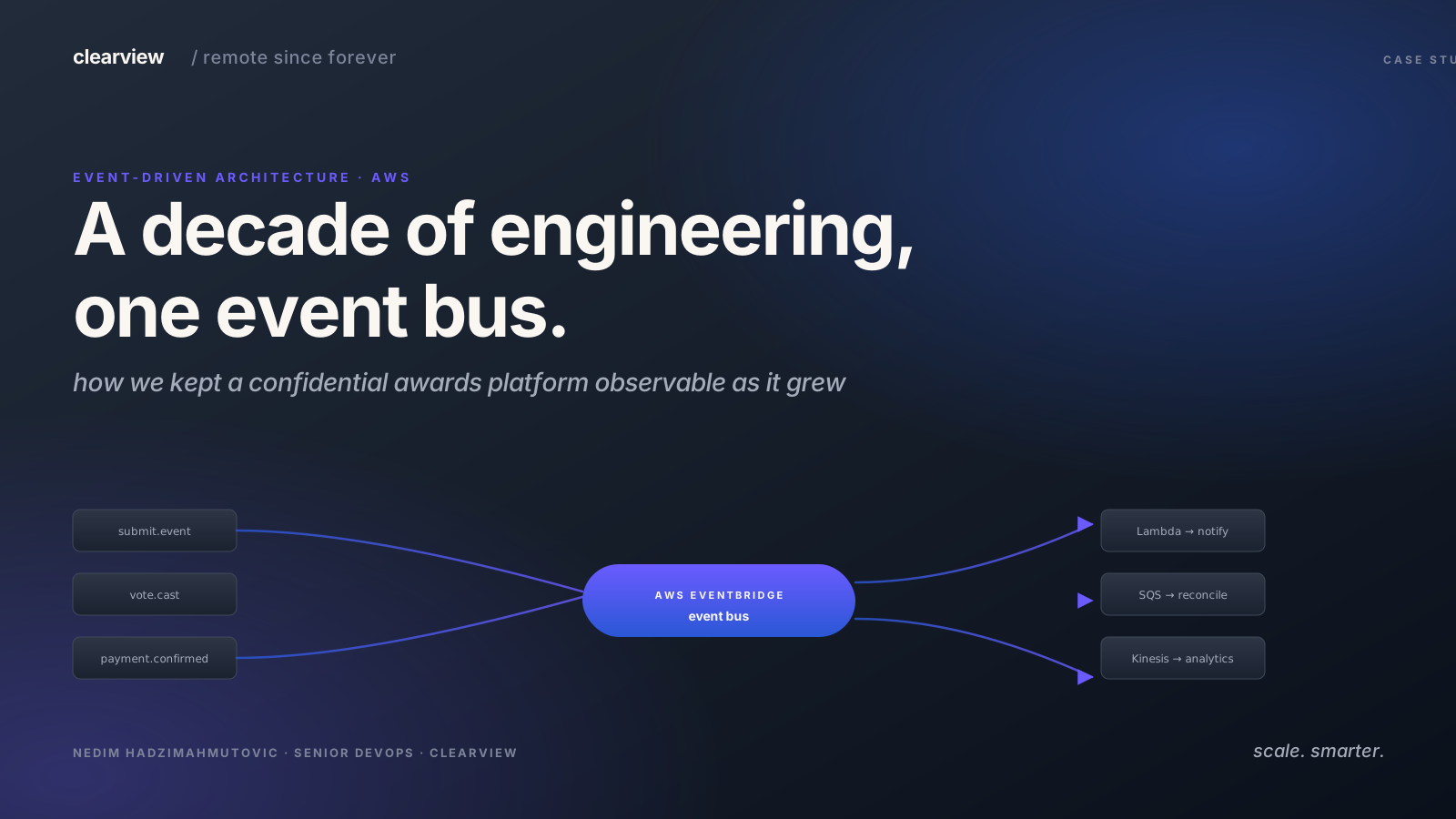
This project aims to solve the client’s requirements to create and continuously improve the membership and awards system while implementing a modern system architecture. More details about what kind of problems the application is designed to solve can be seen in the diagram below.
System Architecture
This application is built around separate services, each running inside its own container. Services communicate through events — state changes that trigger actions elsewhere in the system.
Event-driven Architecture
An event is a state change — a user placing an order, a payment failing, a scheduled job firing. Services produce events and other services consume them, without needing to know about each other directly.
Event-driven architecture is often called EDA for short.
The rest of this post covers how we wired the event bus for job scheduling and monitoring — the piece that lets our team get notified in real-time and react before downtime reaches users.
Event-driven Architecture Showcase
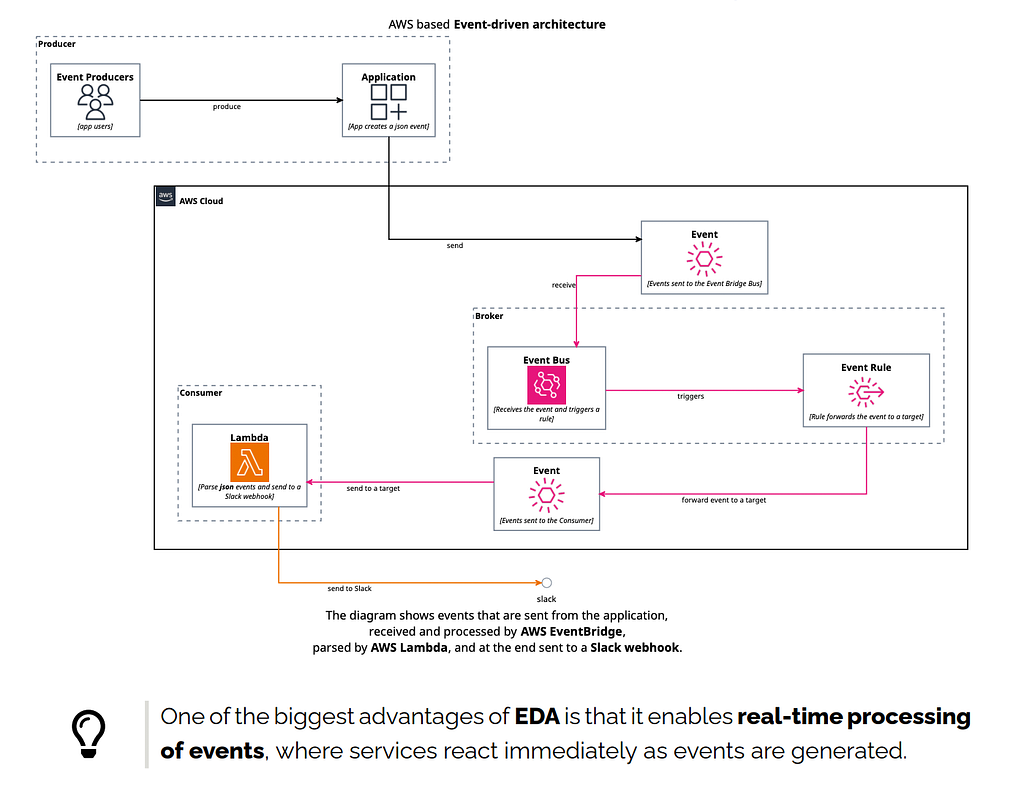
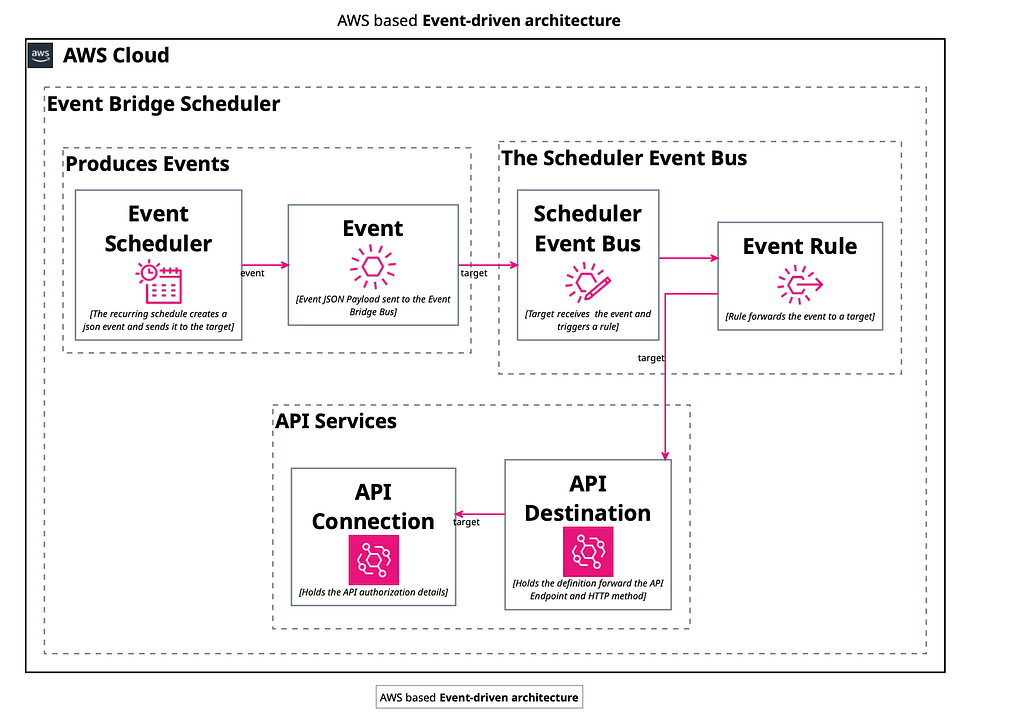
Below is a diagram showing what a typical EDA system looks like and how it functions.
The Application
The application is built on NodeJS with an API service serving multiple front-end domains. This approach has served us well. We have been running the app as a container on AWS.
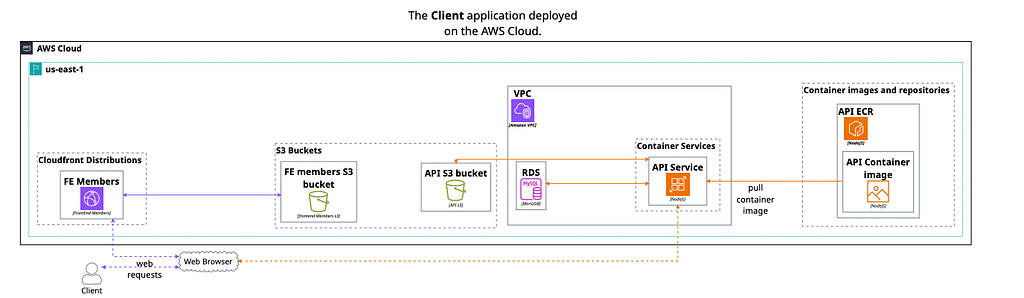
Please keep in mind that the client communicates with the API after it has been loaded on the client-side rendered website.
Event Producers
Events are generated from various services and can be produced either by a client action or by a scheduled job.
API Event Producer
The best example of a client-produced event is any type of event related to credit card payments. The app uses the “@aws-sdk/client-eventbridge” library to communicate with the AWS Event Bridge service.
API Events List
The core services of the app produce events. Below is a list of services with a description of what each does.
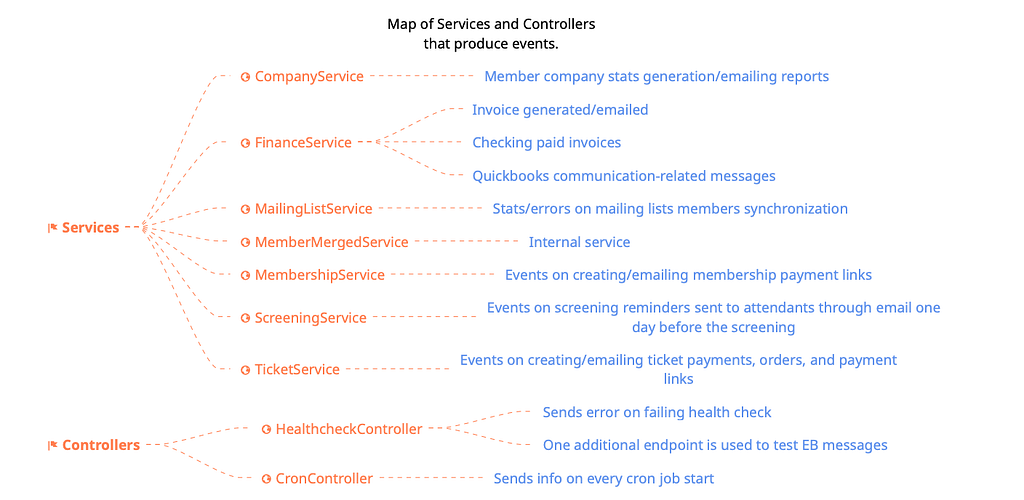
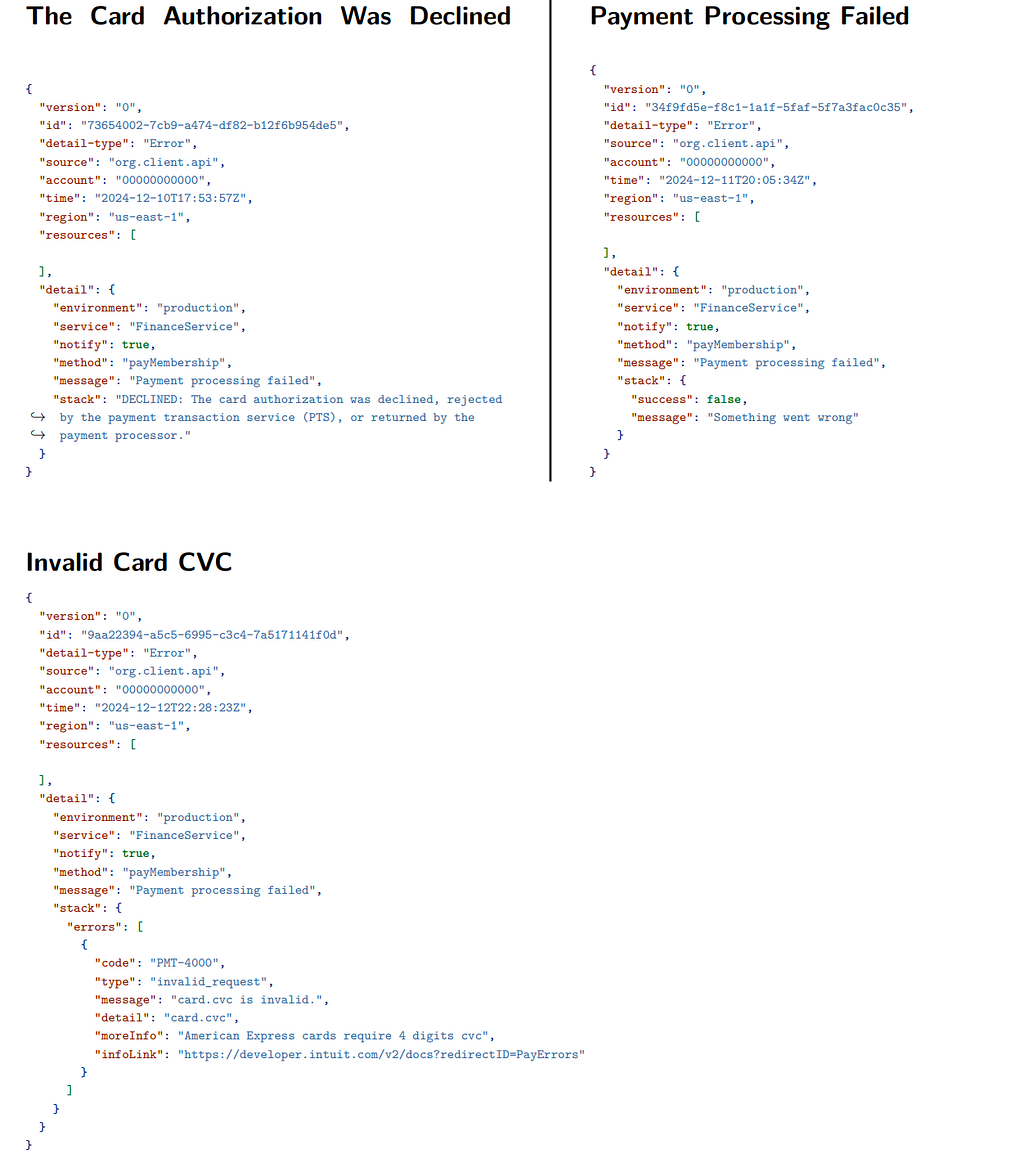
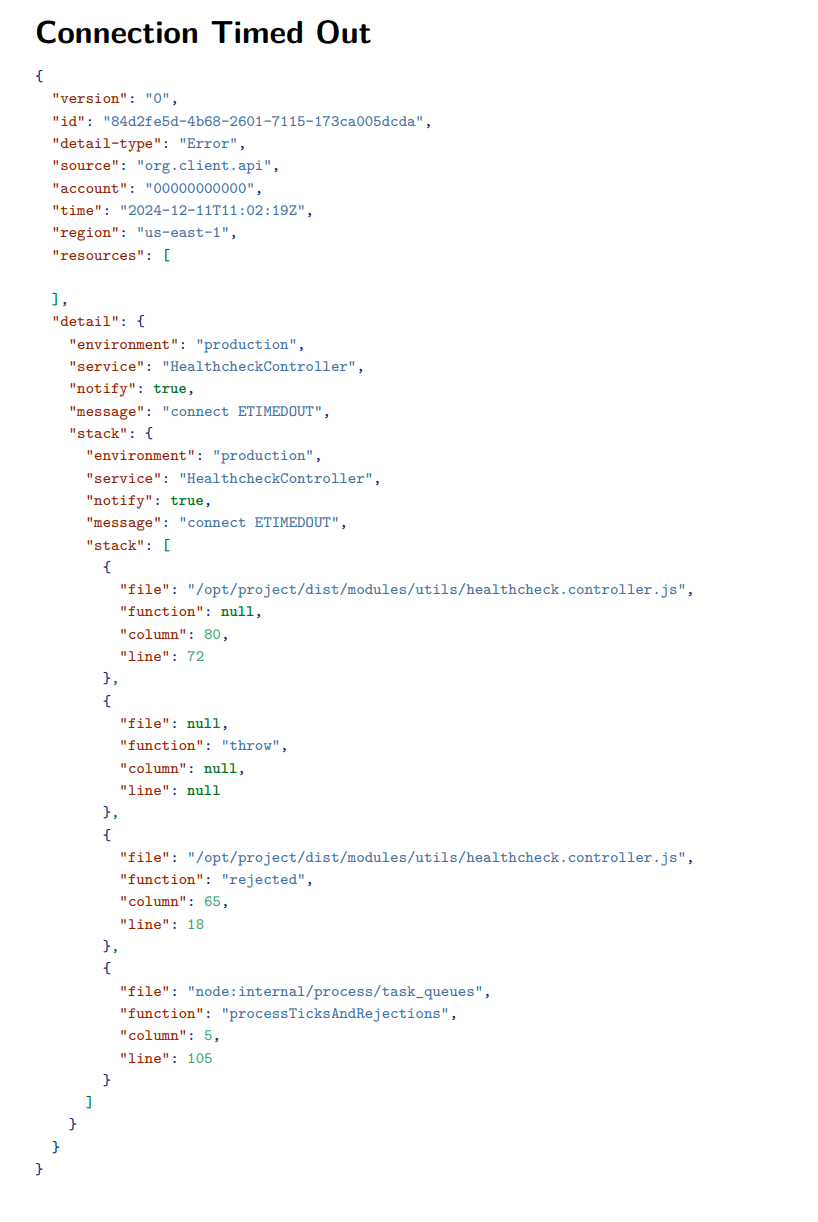
API Produced Sample Events
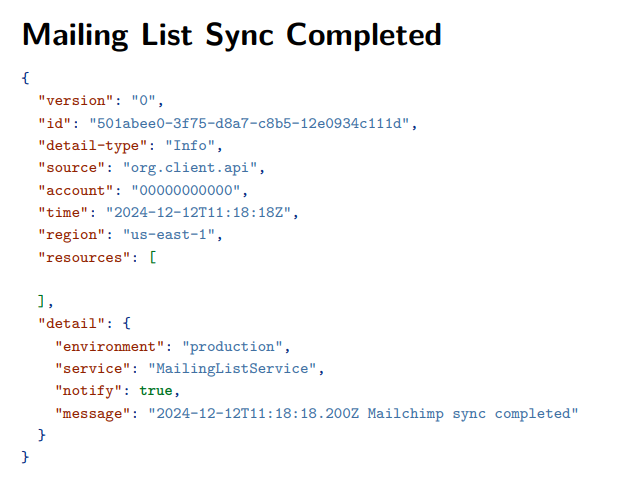
Finance Related Events Below you can find payment processing failed sample events
Scheduler Event Producer
As it was not necessary to re-implement the wheel and create our scheduling service, we relied on the well-tested and proven AWS EventBridge Scheduler for the scheduling system. For this purpose a custom and dedicated Event Bus was created and named Client Production Scheduler Bus.
In this case, the Event Producer is the Scheduler itself.
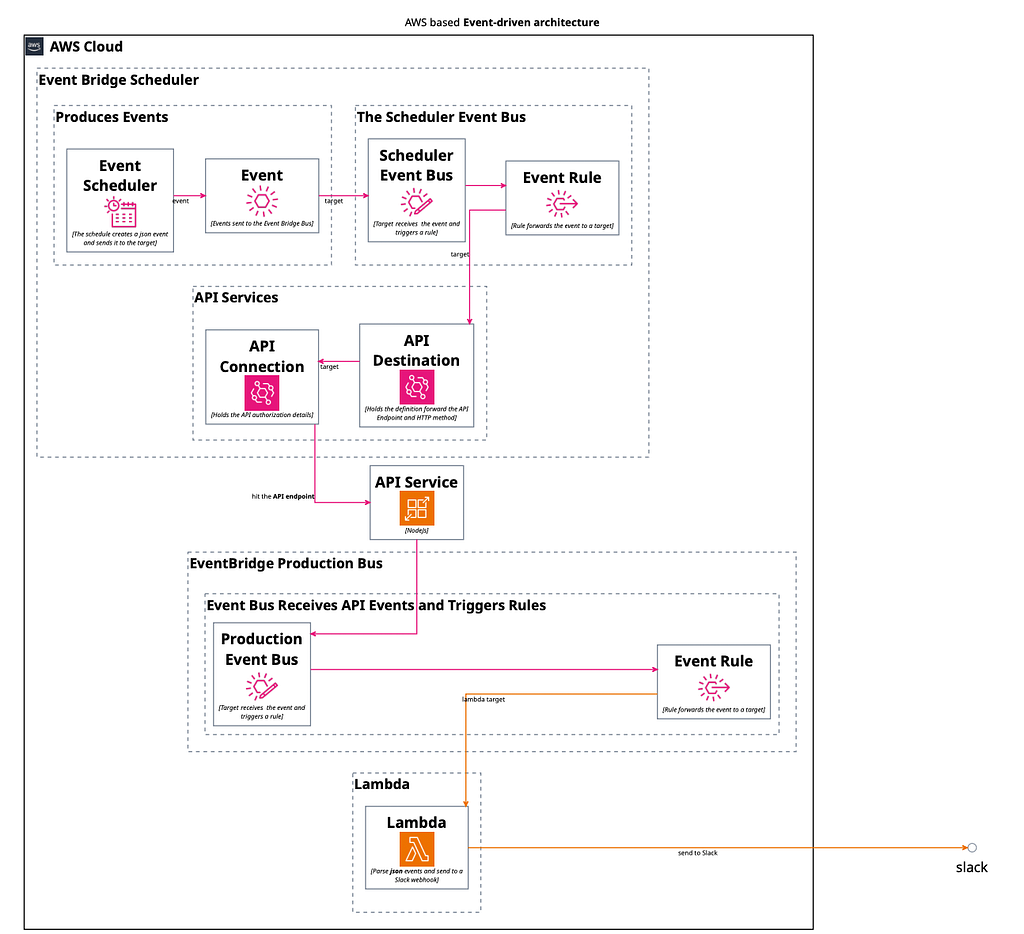
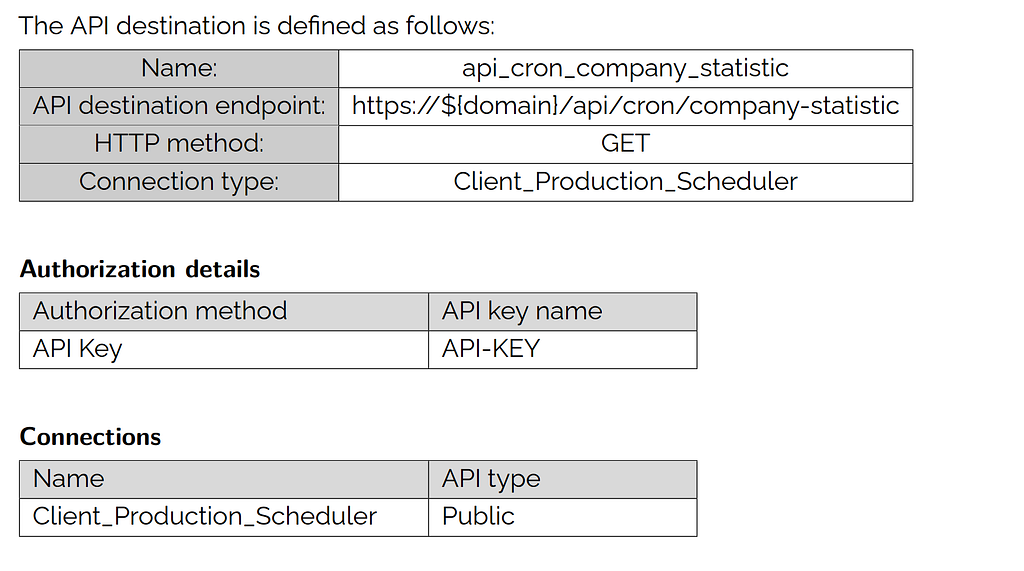
As per the diagram every cron job has the following flow:
- a scheduler of recurring type that produces an event and sends it to the custom scheduler bus,
- an endpoint that is defined as part of the api_destination event rule.
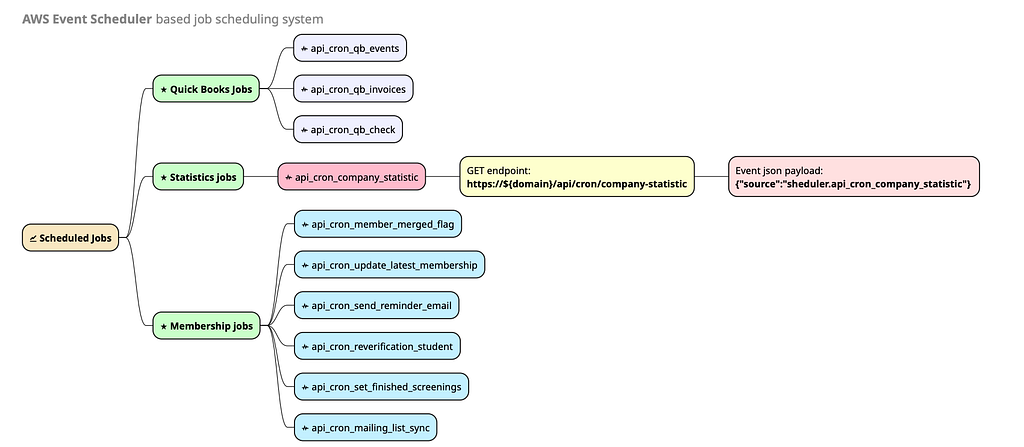
Evaluated Jobs
The complete list can be found below.
Company Statistic Scheduled Job
Event Scheduler Job Notes:
- Recurring schedule type
- Cron expression style
- Runs every 8 hours
- Target: Scheduler Bus
- API PutEvents
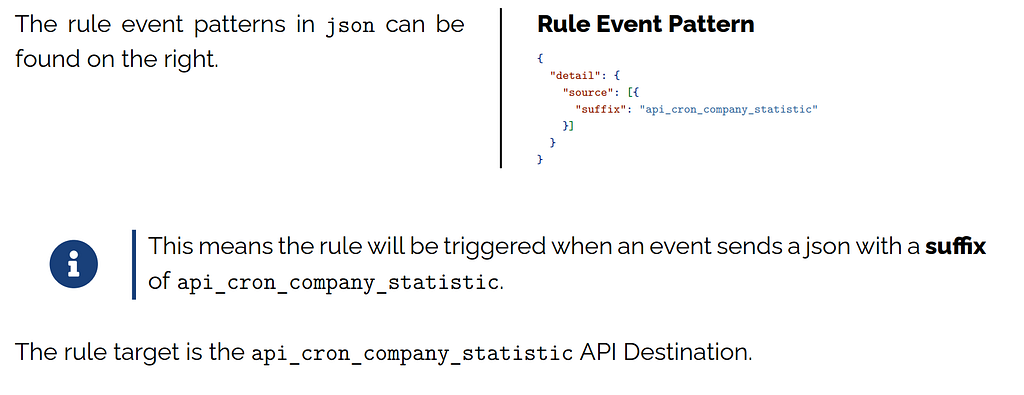
Event Rule
The bus receives the event and triggers the api cron company statistic rule.
The Infrastructure
In this section, we will cover how the AWS infrastructure was set up, the services that send events to the default Event Bus, and how we process and consume those events.
The AWS Account
We used AWS Organizations to separate Production and Development environments. This is important as infrastructure-related events are sent to the default event bus. We wanted production and development events not to trigger the same rules as this could lead to unexpected behaviors.
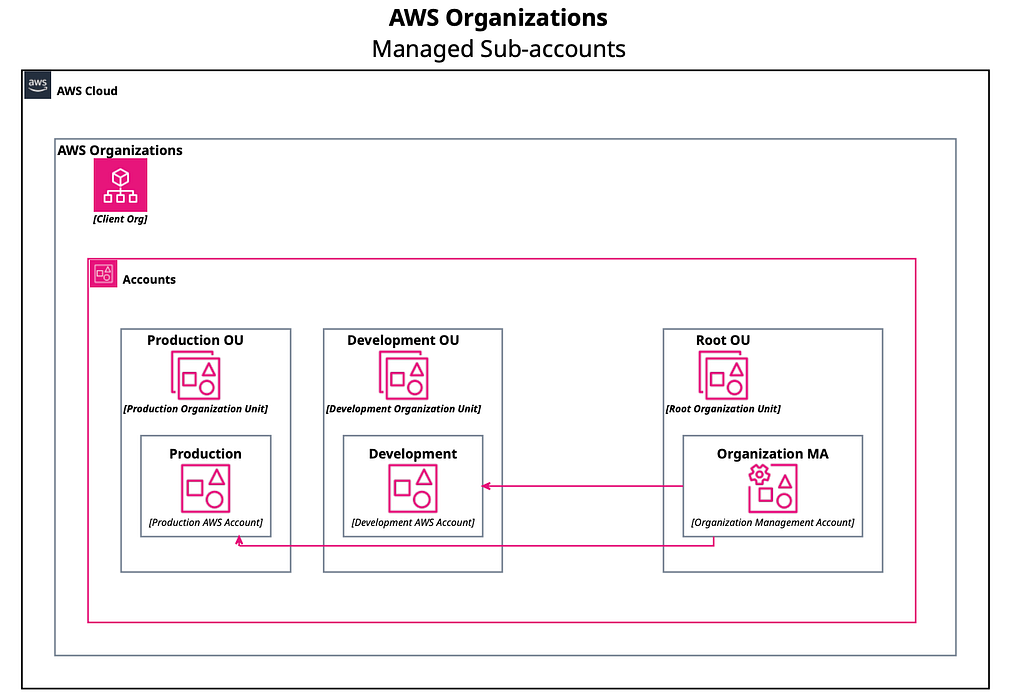
It makes it easier to have two environments not mixing up as we know for a fact that development events will not end up on the production Event Bus causing potential problems.
AWS RDS
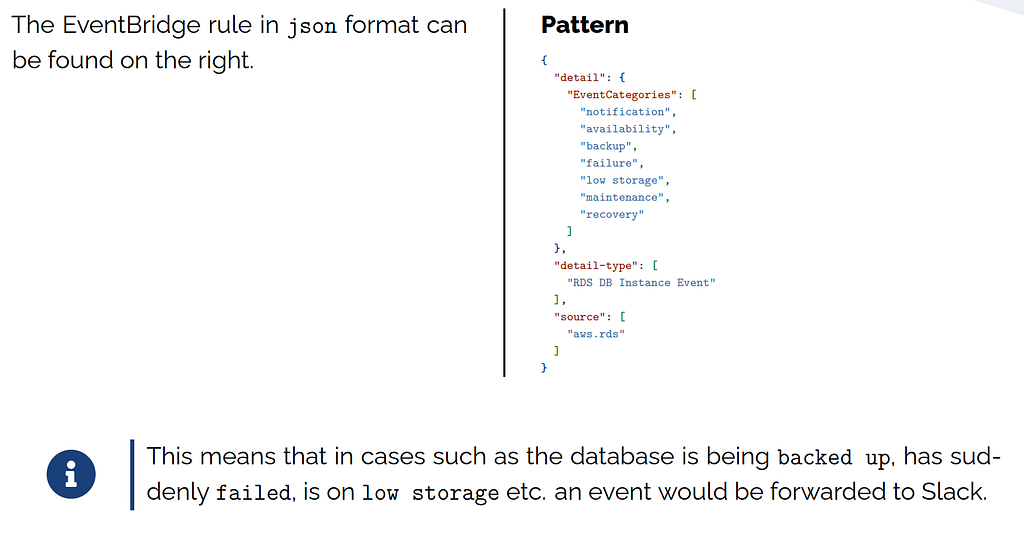
The database service’s health and availability are very important for the app’s reliability. Therefore, we have a setup of monitoring database events with Slack notifications.
Every time there is an event such as the database service backing up an event is created and sent to the Event Bus. Such an event will end up as a Slack notification and be read by our team.
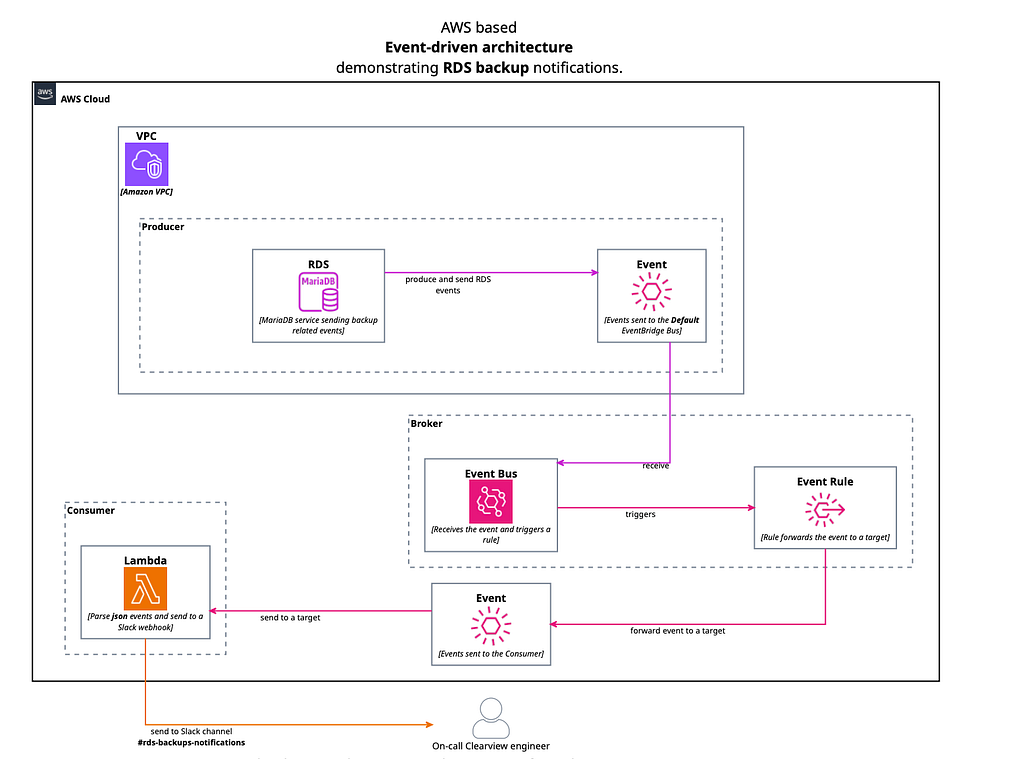
We decided that the following event categories will be forwarded to Slack: Notification, availability, backup, failure, low storage, maintenance and recovery.
The EventBridge Rule
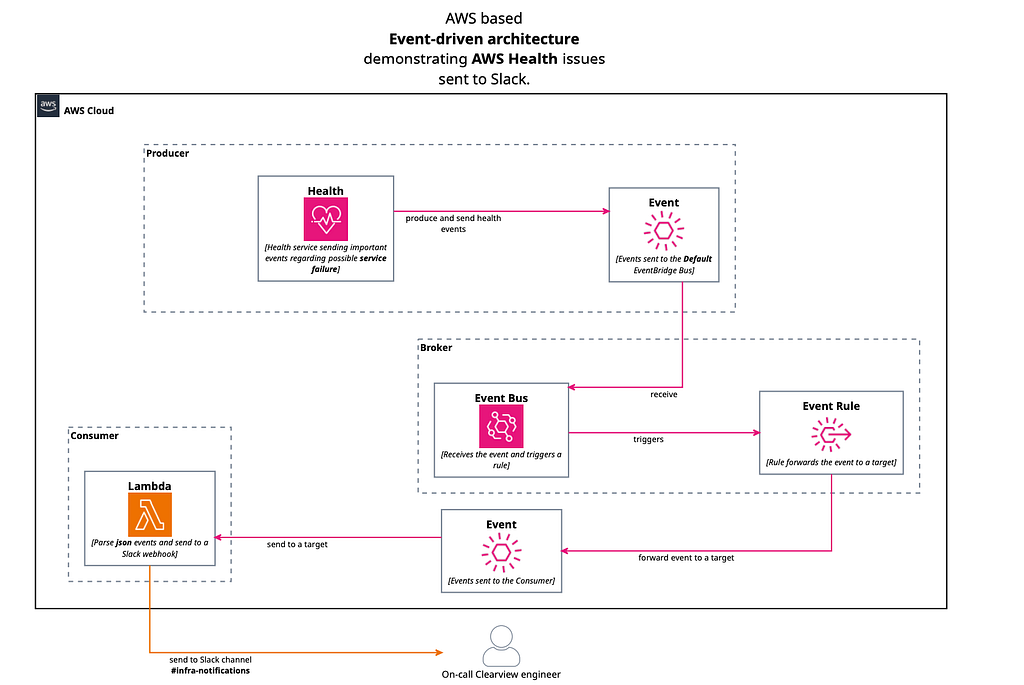
AWS Health
Events type can be one of the following categories:
- accountNotification
- issue
- scheduledChange
AWS Health events are sent to the default Event Bus. We want to react when we receive an event from the AWS Health service, therefore we create rules. For example, you can use AWS Health to receive email notifications if you have AWS resources in your AWS account scheduled for updates, such as EC2 instances. Below you can find examples of such rules.
EC2 service
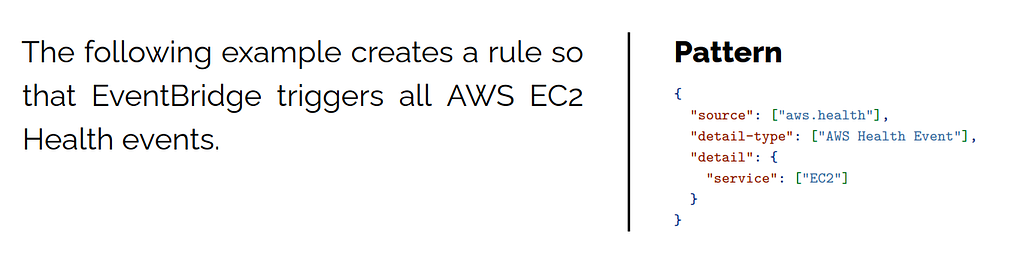
Sample rules
Trigger on Every Event
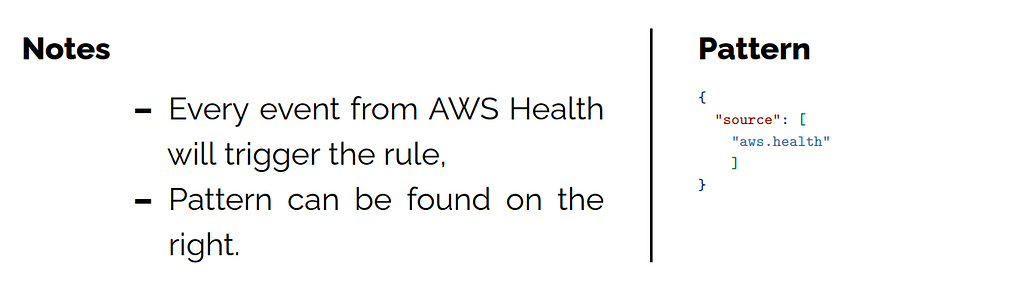
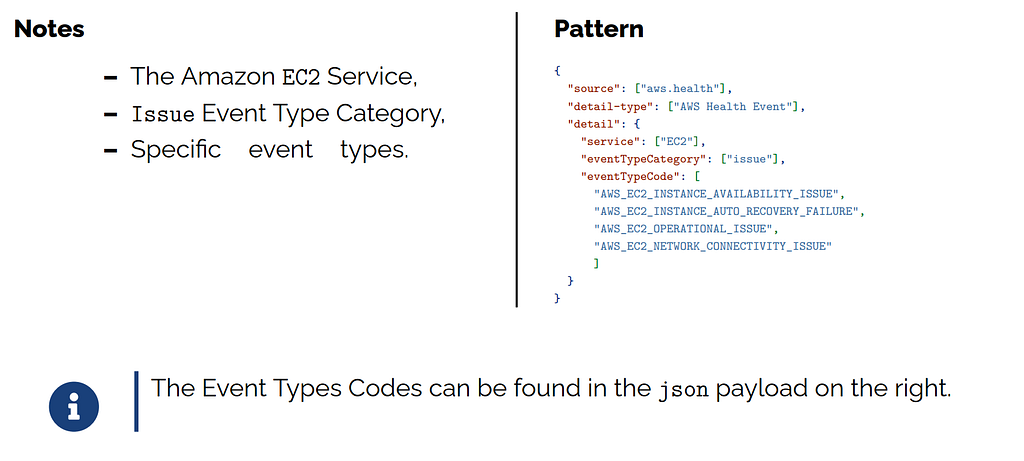
Rule for a specific service and event type category.
In this example, we will create a rule so that EventBridge reacts to the following.
Multiple Services and Event Type Categories
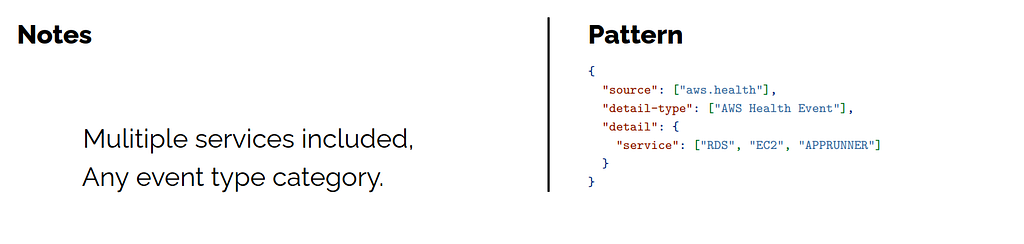
The examples in the previous procedure show you how to create a rule for a single service and event type category. You can also create a rule for multiple services and event-type categories. This means that you don’t have to create a separate rule for each service and category that you want to monitor. To do so, you must edit the event pattern as per following example
Example Rule